Prompt Engineering Guide · Part 9 of 10. An applications part: it assumes the basics from Parts 1–6. New to the series? Start with Part 1: What prompt engineering is, and why it matters.
An AI coding assistant writes plausible code in seconds. Whether that code works depends mostly on the prompt: which language version, which rules, which error message, and how you will check the result. This guide gives you copy-ready AI coding assistant prompts for daily work: generate, explain, debug, refactor, translate, test and review, each with a sample output.
Every prompt works in ChatGPT, Claude, Gemini or your IDE chat. The last sections cover coding agents and verification. The prompts reuse the building blocks from the five parts of a prompt, so read that first if the terms are new.
Generate code from a spec, not a wish
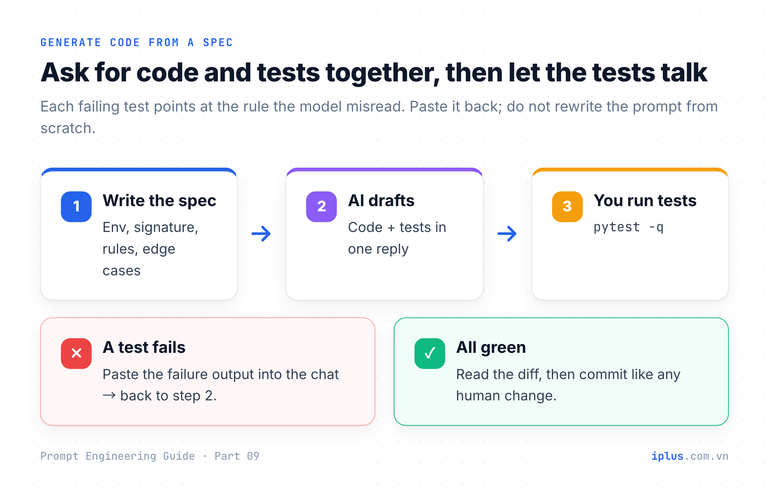
"Write a function that counts business days" leaves the model to guess the version, whether both dates count, how holidays work and what bad input does. Each guess is a possible bug. Write the prompt like a small ticket: environment, signature, rules, edge cases, and tests in the same reply to check every guess.
You are a senior Python developer.

Environment: Python 3.12, standard library only.
Task: write a function with this signature:
    business_days_between(start: date, end: date, holidays: Iterable[date] = ()) -> int

Rules:
- Count Monday to Friday from start to end, both dates included.
- Skip any date in holidays. A holiday that falls on a weekend changes nothing.
- If start is after end, raise ValueError.

Edge cases: same day, a weekend-only range, a holiday on a weekend.
Output: 1) the function with a docstring and type hints,
2) pytest tests that cover every rule and edge case. No other explanation.# workdays.py
from collections.abc import Iterable
from datetime import date, timedelta
def business_days_between(
start: date, end: date, holidays: Iterable[date] = ()
) -> int:
"""Count weekdays (Mon-Fri) from start to end, inclusive, minus holidays."""
if start > end:
raise ValueError("start must be on or before end")
holiday_set = set(holidays)
count = 0
current = start
while current <= end:
if current.weekday() < 5 and current not in holiday_set:
count += 1
current += timedelta(days=1)
return count
# test_workdays.py
from datetime import date
import pytest
from workdays import business_days_between
def test_full_week_counts_five_days():
assert business_days_between(date(2026, 10, 19), date(2026, 10, 25)) == 5
def test_weekday_holiday_is_skipped():
culture_day = date(2026, 11, 3) # Tuesday
assert business_days_between(date(2026, 11, 2), date(2026, 11, 8), [culture_day]) == 4
def test_start_after_end_raises():
with pytest.raises(ValueError):
business_days_between(date(2026, 10, 25), date(2026, 10, 19))
# (trimmed: same-day, weekend-only and weekend-holiday tests)Sample output: wording varies between runs and models
Save the two files, run pytest and you should see 6 passed. If a test fails, paste the failure back: it shows which rule the model misread.
The reusable version. Replace each {…} with your own details:
You are a senior {language} developer.

Environment: {language + version}, {framework/libraries allowed}.
Task: {what to build}, with this signature: {signature}

Rules:
- {rule 1}
- {rule 2}

Edge cases: {list them}
Output: the code, then {test framework} tests covering every rule and edge case.
Tip: put rules on separate lines. Conditions buried in a long sentence get skipped.
Explain and comment unfamiliar code
Name the audience ("a junior developer") so the explanation lands at the right depth, and keep "explain" separate from "change": comments without code changes are easy to review.
Explain this TypeScript function to a junior developer.
1. Say in one sentence what it does.
2. Walk through it line by line and name each language feature it uses.
3. Show one usage example with its output.
4. Return the same code with TSDoc comments added. Do not change any code.

<code>
export const groupBy = <T, K extends PropertyKey>(items: T[], key: (item: T) => K) =>
  items.reduce((acc, item) => {
    (acc[key(item)] ||= []).push(item)
    return acc
  }, {} as Record<K, T[]>)
</code>What it does: groups an array into an object keyed by the key function,
for example support tickets grouped by status.
Line by line:
- <T, K extends PropertyKey>: generics. K is limited to the types allowed
as object keys (string | number | symbol).
- items.reduce(..., {} as Record<K, T[]>): folds every item into an
empty "key -> items" object.
- (acc[key(item)] ||= []): logical OR assignment (ES2021). Creates the
group's array if it does not exist yet, then returns it.
- .push(item); return acc: adds the item and passes the object on.
Example:
groupBy(tickets, (t) => t.status)
// {"open":[{"id":1,...},{"id":3,...}],"closed":[{"id":2,...}]}Sample output: wording varies between runs and models
Debug with the full error, not a summary
"It doesn't work" forces the model to guess. Five inputs make a debugging prompt answerable: the code, the exact error with its stack trace, the environment, expected versus actual behavior, and what you already tried. Ask for the root cause before the fix, so you judge the reasoning and not only the patch.
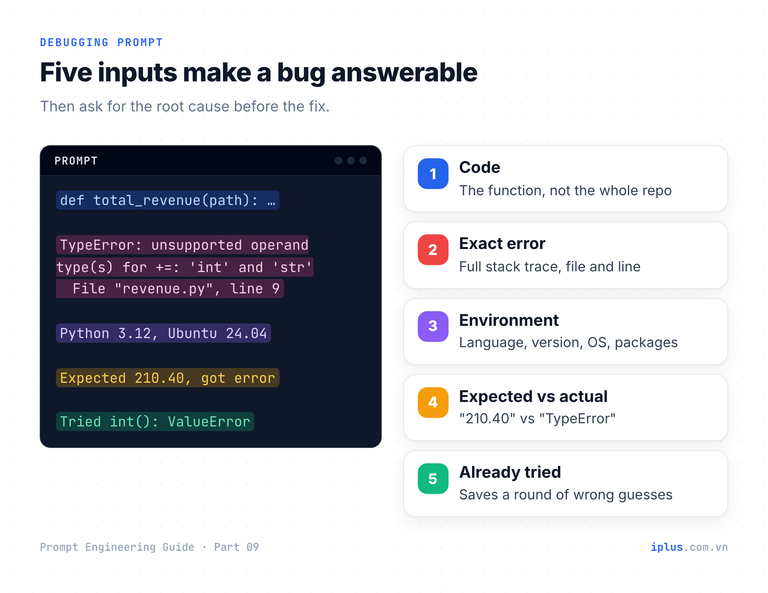
Find the root cause of this bug before proposing a fix.

Code (revenue.py):
import csv


def total_revenue(path):
    total = 0
    with open(path, newline="") as f:
        for row in csv.DictReader(f):
            if row["status"] == "paid":
                total += row["amount"]
    return total


print(total_revenue("orders.csv"))

Input file (orders.csv):
order_id,status,amount
1001,paid,120.50
1002,refunded,40.00
1003,paid,89.90

Error:
Traceback (most recent call last):
  File "/app/revenue.py", line 13, in <module>
    print(total_revenue("orders.csv"))
  File "/app/revenue.py", line 9, in total_revenue
    total += row["amount"]
TypeError: unsupported operand type(s) for +=: 'int' and 'str'

Environment: Python 3.12 on Ubuntu 24.04, no third-party packages.
Expected: 210.40 (the sum of paid orders). Actual: the error above.
Already tried: wrapping the value in int(), which raises ValueError on "120.50".

Answer with: 1) the root cause in two sentences, 2) the minimal fix,
3) any other bug you see in this function.1) Root cause: csv.DictReader returns every field as a string, so
row["amount"] is "120.50", not a number. Python cannot add a str to
the int total, hence the TypeError; int() fails because "120.50" is
not an integer literal.
2) Minimal fix: parse the amount as Decimal, which keeps cents exact.
from decimal import Decimal
...
total = Decimal("0")
...
total += Decimal(row["amount"])
Result: 210.40 (float would drift on other inputs: 0.1 + 0.2 is
0.30000000000000004, wrong for money)
3) Other risk: row["status"] == "paid" silently skips "Paid " (case and
whitespace). Consider row["status"].strip().lower().Sample output: wording varies between runs and models
Refactor, optimize and translate code without changing behavior
"Faster" or "cleaner" AI code is sometimes slower, subtly different, or both. Give hard constraints (same signature, same output order, no new dependencies) and demand proof you can run: an equivalence test against the old version plus a benchmark.
Optimize a slow function, with proof
Optimize this Python 3.12 function. It takes about a second on 5,000 emails
and gets four times slower each time the list doubles.

def find_duplicate_emails(emails):
    duplicates = []
    for i, email in enumerate(emails):
        for other in emails[i + 1:]:
            if email.lower() == other.lower() and email.lower() not in duplicates:
                duplicates.append(email.lower())
    return duplicates

Constraints:
- Same signature and exactly the same output, including order.
- Standard library only.
Then write bench_dupes.py that (1) asserts the old and new versions return
the same result on random data and on edge cases, and (2) times both.
State the time complexity before and after.Complexity: the original compares every pair, O(n²) string comparisons,
plus a linear "not in duplicates" list search. The version below is O(n).
from collections import Counter
def find_duplicate_emails(emails: list[str]) -> list[str]:
"""Return lowercased emails that appear more than once, in first-seen order."""
counts = Counter(email.lower() for email in emails)
seen: set[str] = set()
result: list[str] = []
for email in emails:
key = email.lower()
if counts[key] > 1 and key not in seen:
seen.add(key)
result.append(key)
return result
# bench_dupes.py (trimmed); the original is kept as find_duplicate_emails_old
emails = [f"user{random.randint(0, 3000)}@Example.com" for _ in range(5000)]
for case in (emails, [], ["[email protected]"], ["[email protected]", "[email protected]", "[email protected]", "[email protected]"]):
assert find_duplicate_emails(case) == find_duplicate_emails_old(case)
old = timeit.timeit(lambda: find_duplicate_emails_old(emails), number=1)
new = timeit.timeit(lambda: find_duplicate_emails(emails), number=1)
print(f"old: {old:.3f}s new: {new:.4f}s speed-up: {old / new:.0f}x")Sample output: wording varies between runs and models
On our machine (Python 3.14, 5,000 emails) the script printed old: 0.893s new: 0.0013s speed-up: 666x. Your numbers will differ; the asserts are what matter, because they prove the same answer before you trust the speed.
Translate code between languages
A line-by-line translation compiles, yet behaves differently wherever the languages disagree: rounding, integer division, number size, dates. Ask for preserved behavior, a list of semantic differences, and tests whose inputs expose them.
Translate this JavaScript to Python 3.12. Preserve behavior exactly,
including rounding and number handling. List every semantic difference
between the two languages you had to handle, then give 3 test cases
whose inputs would expose a naive translation.

function lineTotal(unitPriceCents, qty, discountPct) {
  const gross = unitPriceCents * qty;
  const discount = Math.round((gross * discountPct) / 100);
  return gross - discount;
}import math
def js_round(x: float) -> int:
"""Match JavaScript Math.round: halves round up (toward +infinity)."""
return math.floor(x + 0.5)
def line_total(unit_price_cents: int, qty: int, discount_pct: float) -> int:
gross = unit_price_cents * qty
discount = js_round(gross * discount_pct / 100)
return gross - discount
Semantic differences handled:
1. Rounding: Math.round rounds halves up (2.5 -> 3); Python's round()
rounds to even (2.5 -> 2), so js_round() reproduces JS.
2. Number size: JS integers are exact only to 2^53 - 1; Python ints are
unbounded. Same results for realistic prices.
Test cases (unit_price_cents, qty, discount_pct -> expected):
- (125, 1, 2) -> 122 naive round() gives 123
- (1999, 3, 10) -> 5397
- (350, 1, 5) -> 332Sample output: wording varies between runs and models
We ran both: JavaScript and the translated Python return 122 5397 332; a naive round() translation returns 123 for the first case, a one-cent bug per invoice line.
Trap | JavaScript | Python | Java |
|---|---|---|---|
Rounding a half |
|
|
|
Integer division |
|
|
|
Negative modulo |
|
|
|
Large integers | Exact only to 2^53 − 1 | Unbounded int | 64-bit long overflows |
Month numbers |
|
|
|
Give multi-file context the model can navigate
Paste only the relevant files, each tagged with its path; files first, task last. Anthropic reports that queries placed after long inputs can improve response quality by up to 30%. And give the model permission to stop, which prevents invented imports.
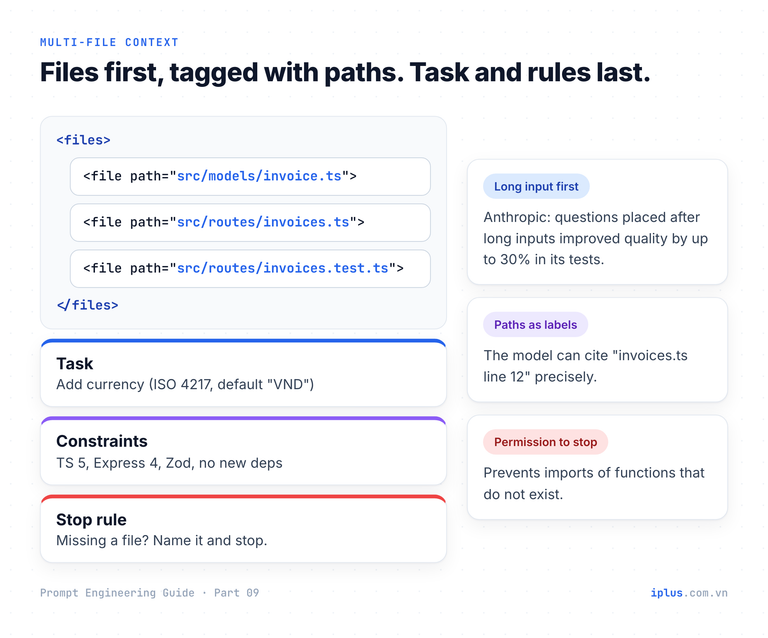
<files>
<file path="src/models/invoice.ts">
{paste file}
</file>
<file path="src/routes/invoices.ts">
{paste file}
</file>
<file path="src/routes/invoices.test.ts">
{paste file}
</file>
</files>

Task: add an optional currency field (ISO 4217 code, default "VND") to
invoices. Accept it in POST /invoices, validate it, return it in responses.
Constraints: TypeScript 5, Express 4, Zod; no new dependencies; existing
tests must keep passing.
Before writing code, list the files you will change and why. If you need
a file I did not include, name it and stop.
Then show each change as a unified diff.
Replace each {paste file} with the file contents. A typical first reply:
Plan
1. src/models/invoice.ts: add currency: string to the Invoice type and
   default it to "VND" in createInvoice().
2. src/routes/invoices.ts: extend the Zod schema with
   currency: z.string().regex(/^[A-Z]{3}$/).default("VND").
3. src/routes/invoices.test.ts: test that the default is applied, that
   "USD" is accepted, and that "vnd" and "VNDX" return 400.

Missing context: invoices.ts imports saveInvoice from src/db/invoices.ts,
which builds the INSERT, and the table needs a migration. Please share
src/db/invoices.ts and your migration layout before I write the diffs.
Sample output: wording varies between runs and models
Unit tests and code review that catch real bugs
Generate unit tests
Ask for the behaviors first, then the tests. Name the framework and forbid mocking the function under test, a common way AI tests end up testing nothing. Run them, and break the function once to confirm they fail.
Write pytest tests for the function below.
First list the behaviors and edge cases you will cover, one line each.
Then write the tests:
- use @pytest.mark.parametrize for groups of similar cases
- do not mock mask_email itself
- include invalid inputs that must raise ValueError

def mask_email(email: str) -> str:
    """Keep the first character of the local part, mask the rest: j***@example.com."""
    local, sep, domain = email.strip().partition("@")
    if not sep or not local or not domain or "@" in domain:
        raise ValueError(f"not an email address: {email!r}")
return f"{local[0]}{'*' * (len(local) - 1)}@{domain.lower()}"Behaviors: masks all but the first local character; keeps a 1-char local
part; lowercases the domain; trims spaces; rejects malformed addresses.
# test_masking.py
import pytest
from masking import mask_email
@pytest.mark.parametrize(
("email", "expected"),
[
("[email protected]", "j*******@example.com"),
("[email protected]", "[email protected]"), # one-character local part
("[email protected]", "J***@example.com"), # domain lowercased
# (trimmed: whitespace case)
],
)
def test_masks_valid_addresses(email, expected):
assert mask_email(email) == expected
@pytest.mark.parametrize(
"bad",
["", "no-at-sign", "@example.com", "john@", "a@[email protected]"],
)
def test_rejects_invalid_addresses(bad):
with pytest.raises(ValueError):
mask_email(bad)Sample output: wording varies between runs and models
The full file gives 9 passed.
Ask for a code review with a severity scale
"Review this code" mixes style nits with real defects. Define categories and severity levels, require a line and a fix per finding, and allow "none found": without it, models tend to invent findings to fill every category.
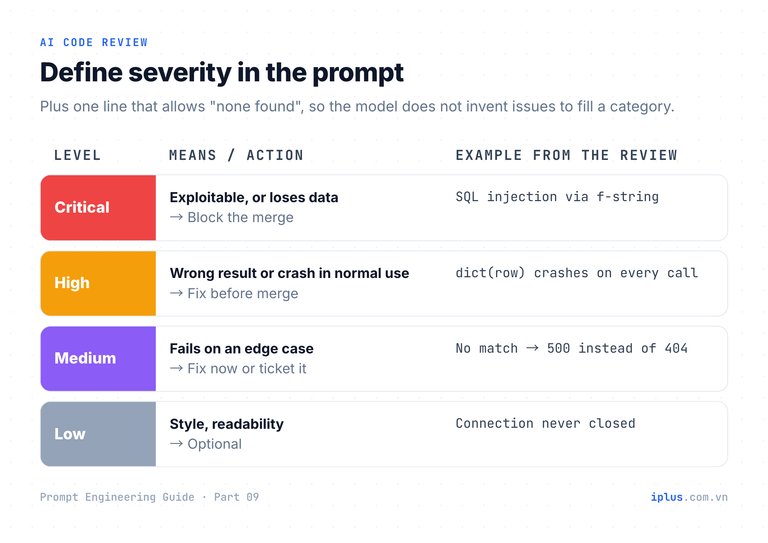
Review this Flask endpoint (Python 3.12, SQLite) for bugs, security,
performance and readability.
Severity: Critical = exploitable or data loss; High = wrong result or
crash in normal use; Medium = edge-case failure; Low = style.
Return a table: severity | line | problem | fix. Sort by severity.
If a category has no issues, write "none found" instead of guessing.

@app.get("/users")
def find_user():
    email = request.args.get("email")
    conn = sqlite3.connect("app.db")
    row = conn.execute(f"SELECT * FROM users WHERE email = '{email}'").fetchone()
return jsonify(dict(row))| Severity | Line | Problem | Fix |
|----------|------|---------|-----|
| Critical | 5 | SQL injection: email is formatted into the query, so ' OR '1'='1 returns users | Parameterize: conn.execute("SELECT ... WHERE email = ?", (email,)) |
| High | 5-6 | SELECT * returns every column, including any password hash, to the client | Select only public columns (id, name, email) |
| High | 6 | dict(row) fails: sqlite3 rows are tuples unless row_factory is set | Set conn.row_factory = sqlite3.Row |
| Medium | 6 | No match returns None, so dict(None) raises and the API answers 500 | Return 404 when row is None |
| Medium | 3 | Missing email parameter queries for 'None' | Return 400 when email is absent |
| Low | 4 | Connection is never closed | Use with closing(sqlite3.connect(...)) |
Performance: none found.Sample output: wording varies between runs and models
Regex and shell one-liners: demand test cases
One-liners are dense and easy to get subtly wrong, and dialects differ (Python vs JavaScript regex, GNU vs BSD tools). State the dialect and ask for an explanation plus examples that match and must not.
Write a Python (re module) pattern that validates a date in YYYY-MM-DD form.
- Explain each part of the pattern.
- Give 4 strings that match and 4 that must not.
- Say what the pattern does NOT check, and how to check it.Pattern (use with re.fullmatch):
[0-9]{4}-(0[1-9]|1[0-2])-(0[1-9]|[12][0-9]|3[01])
- [0-9]{4} four-digit year
- (0[1-9]|1[0-2]) month 01-12
- (0[1-9]|[12][0-9]|3[01]) day 01-31
Matches: 2026-10-20, 1999-01-01, 2024-02-29, 2026-12-31
Rejects: 2026-13-01, 2026-00-10, 2026-1-5, 2026-10-32
Not checked:
- Days per month: 2026-02-30 passes. Use date.fromisoformat() for that.
- I used [0-9], not \d: in Python, \d also matches non-ASCII digits
such as full-width 2026.
- Use re.fullmatch rather than ^...$ with re.match: $ also matches
before a trailing newline, so "2026-10-20\n" would pass.Sample output: wording varies between runs and models
We checked each claim in Python (see the re module documentation). Details like these only appear when you ask "what does it not check?".
Give me a shell command that lists .log files under /var/log larger than
100 MB and modified in the last 7 days, with their sizes. It must work on
both GNU (Linux) and BSD (macOS) find. Do not delete anything.
Explain each flag.find /var/log -type f -name '*.log' -size +100M -mtime -7 -exec ls -lh {} +
-type f regular files only
-name '*.log' quoted so the shell does not expand the *
-size +100M larger than 100 MiB (works in GNU and BSD find)
-mtime -7 modified less than 7 days ago
-exec ls -lh {} + print sizes, batching many files into one ls callSample output: wording varies between runs and models
Prompts for coding agents: instruction files and task briefs
Coding agents (Claude Code, Cursor, GitHub Copilot, OpenAI Codex) edit files and run commands. Two prompts steer them. The first is an instruction file read at the start of every session: CLAUDE.md for Claude Code, .github/copilot-instructions.md for Copilot, .cursor/rules for Cursor, and AGENTS.md, an open format read by Codex, Cursor and Copilot (Claude Code can read it in place of CLAUDE.md). Keep it short: commands, conventions, guardrails.
# AGENTS.md

## Commands
- Type-check: `pnpm typecheck` (must pass with zero errors)
- Lint: `pnpm lint` (zero warnings)
- Test: `pnpm vitest run`

## Conventions
- TypeScript strict mode. No `any` in new code.
- API handlers live in `src/app/api/`; validate every request body with Zod.
- Money is stored as integer minor units (cents/đồng), never floats.

## Guardrails
- Never edit files under `src/migrations/` by hand; generate them.
- Never commit secrets. Read config from environment variables.
- Ask before adding a dependency.
The second is the task brief: goal, constraints, a definition of done the agent can check by running commands, and when to stop and ask.
Goal: add rate limiting to POST /api/contact: at most 5 requests per IP
per 10 minutes; the 6th returns 429 with { success: false, error }.

Context: we already use Upstash Redis (see src/lib/rate-limit.ts).
Constraints: reuse that helper; no new dependencies; do not change the
response shape for successful requests.
Done when: pnpm typecheck, pnpm lint and pnpm vitest run pass, and a new
test proves the 6th request in the window gets 429.
Stop and ask if: the helper cannot express a 10-minute window, or a
change outside src/app/api/contact/ seems necessary.Done.
- route.ts: rateLimit(ip, { limit: 5, window: "10 m" }) before
validation; 429 with { success: false, error } when exceeded.
- route.test.ts: 6 requests from one IP -> [200 x5, 429].
Checks: typecheck 0 errors, lint 0 warnings, vitest 48 passed (1 new).Sample output: wording varies between runs and models
An engineer who specifies and reviews while the agent implements is the model behind our Claude Code × senior engineer delivery approach.
Verify everything: what AI coding help cannot do
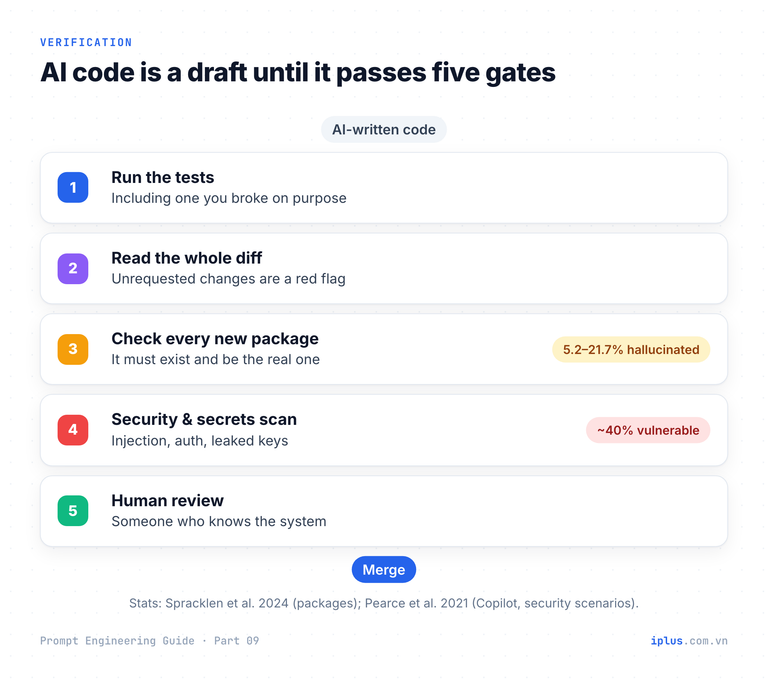
In a plain chat, the model does not run your code unless the product gives it an execution tool. "Act as a Linux terminal" output is invented: a guess, never a test result. Research shows why verification is not optional:
- Pearce et al. (2021) generated 1,689 programs with GitHub Copilot in security-relevant scenarios and found about 40% vulnerable.
- Spracklen et al. (2024) analysed 576,000 code samples: 5.2% of packages suggested by commercial models and 21.7% by open-source models did not exist, names attackers can register with malware.
- In a 2025 METR randomized trial, experienced open-source developers were 19% slower with AI tools yet believed they were 20% faster.
Models have improved since, but the time saved writing code must be spent checking it. Before running anything, ask the model for its weak spots:
Before I run this code, list:
1. every assumption you made about inputs, environment and versions;
2. every package, function or API you used that I should verify exists
   in {language/framework + version};
3. the three inputs most likely to break it.1. Assumptions: UTF-8 CSV with a header; "." as decimal separator.
2. To verify: csv.DictReader, decimal.Decimal (stdlib, Python 3.12).
3. Likely to break: "1,200.50", "Paid " with a space, an empty amount.Sample output: wording varies between runs and models
Warning: never paste secrets, credentials or customer data into an AI tool. Use placeholders such as {API_KEY} and follow company policy on sharing source code.
Common mistakes with AI coding prompts
Mistake | What goes wrong | Do this instead |
|---|---|---|
No language or version | Code for the wrong runtime or a removed API | State "Python 3.12", "Node 22", "Spring Boot 3" |
"It doesn't work" | The model guesses a cause | Paste the exact error, input, expected vs actual |
Accepting "optimized" code | Slower or subtly different behavior | Require an equivalence test and a benchmark |
Pasting the whole repository | The relevant lines get diluted | Paste only the files involved, tagged with paths |
Trusting simulated output | "Terminal" or "SQL" results are invented | Run the code yourself or use a real execution tool |
Installing suggested packages blindly | The package may not exist or may be malicious | Check the registry page, maintainer and downloads first |
Pasting secrets or customer data | Leaks to a third party | Use placeholders and follow company policy |
FAQ
What is the best prompt for an AI coding assistant?
No single prompt; the ones that work share a structure: environment, task with signature, rules as a list, edge cases, and tests in the output. The spec template above covers most cases.
Can AI find bugs in my code?
Often, given the exact error, input and expected result. It is weaker at bugs that depend on runtime state it cannot see, such as database contents or timing. Confirm its root cause with a test.
Is it safe to paste company code into ChatGPT or Claude?
It depends on company policy and your plan: business and API plans usually have different retention and training terms than free plans. Never paste secrets or personal data.
Do reasoning models still need "think step by step" for debugging?
Little: they reason before answering anyway. Asking for the root cause before the fix still helps, because it makes the reasoning checkable. See combining techniques for how to structure multi-step prompts.
Sources and further reading
- Learn Prompting: Coding Assistance
- Pearce et al. (2021): Asleep at the Keyboard?
- Spracklen et al. (2024): package hallucinations by code-generating LLMs
- METR (2025): AI and experienced open-source developer productivity
- Anthropic: Prompting best practices (long context prompting)
- Claude Code docs: How Claude remembers your project (CLAUDE.md, AGENTS.md)
- AGENTS.md: an open format for guiding coding agents
- GitHub Docs: Adding repository custom instructions for GitHub Copilot
- Cursor Docs: Rules
- Python docs: round() and MDN: Math.round()
Prompt Engineering Guide: all parts
← Previous: Part 8: Prompts for emails, blog posts and marketing · Next: Part 10: Build a knowledge-base chatbot (RAG) →
Read Parts 1–6 in order: each builds on the one before. Parts 7–10 apply them and can be read in any order once you have the basics.
- Part 1: What prompt engineering is, and why it matters
- Part 2: How LLMs work: generative AI basics
- Part 3: Prompt structure: the five parts of a prompt
- Part 4: Instruction and role prompting
- Part 5: Zero-shot, one-shot and few-shot prompting
- Part 6: Combining techniques, priming and iteration
- Part 7: Prompts for summaries, tables and document analysis
- Part 8: Prompts for emails, blog posts and marketing
- Part 9: Prompts for coding assistants (you are here)
- Part 10: Build a knowledge-base chatbot (RAG)
Need help with this?
Explore the iPlus Solution services most relevant to this article.