Prompt Engineering Guide · Part 4 of 10. This part builds on Part 3: Prompt structure: the five parts of a prompt. New to the series? Start with Part 1: What prompt engineering is, and why it matters.
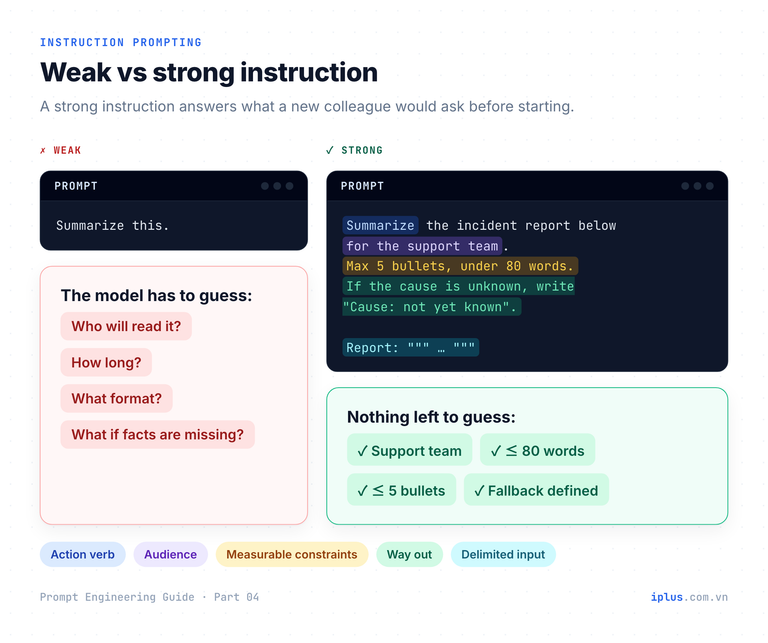
Most disappointing AI answers are not model failures. They are instruction failures: the prompt left out the audience, the length, the format or what to do when information is missing, so the model filled the gaps with guesses. Instruction prompting and role prompting are the two techniques that close those gaps, and between them they cover most everyday prompting.
An instruction says what to do. A role says who is speaking and for whom. This guide shows how to write both, with samples you can paste into ChatGPT, Claude or Gemini as they are. It also shows the limit that many tutorials skip: a role changes how the answer sounds, but it does not reliably make the answer more correct.
What is instruction prompting?
Instruction prompting means describing a task in plain language instead of training a model on examples of it. It works because today’s chat models are instruction-tuned. Google’s FLAN paper (Wei et al., 2021) showed that fine-tuning a model on many tasks phrased as instructions improves its zero-shot performance on task types it never saw. OpenAI’s InstructGPT work (Ouyang et al., 2022) added human feedback, and labelers preferred outputs from a 1.3B-parameter InstructGPT model over the 175B GPT-3.
The practical consequence: a model can do a job nobody trained it for, such as reformatting your customer list, as long as the instruction is precise. The three samples below are tasks of that kind.
Sample 1: normalize messy records
Data cleaning is the classic instruction task. Note rule 1 and rule 2: they give the model a way to say “I am not sure” instead of guessing. Paste your own records between the triple quotes.
Normalize each customer record below into this exact format, one per line:
Last name, First name | YYYY-MM-DD | City, Country

Rules:
1. Names: family name first, in Title Case. If you cannot tell which part is the family name, keep the input order and add "(check)" at the end of the line.
2. Dates: the input mixes US (MM/DD) and day-first formats. A date with a month name, or with a day above 12, is unambiguous. If a numeric date could be read both ways, write "????-??-??" and add "(check)".
3. Places: fix obvious misspellings. Write the country's full English name. If the country is missing, write "?" and do not guess.

Records:
"""
smith, JOHN - born 03/04/1990 - london uk
Nguyen Van An; 15 Jan 1988; Ha Noi, Vietnam
maria garcia | 1992-11-30 | Madird, Spain
Tanaka Yuki, 12/25/1985, Osaka
"""Smith, John | ????-??-?? | London, United Kingdom (check)
Nguyen, Van An | 1988-01-15 | Hanoi, Vietnam
Garcia, Maria | 1992-11-30 | Madrid, Spain
Tanaka, Yuki | 1985-12-25 | Osaka, ?Sample output: wording varies between runs and models
The ambiguous date was flagged rather than guessed, and the missing country stayed missing. Without those two rules, most models would silently pick an interpretation.
Sample 2: redact personal information
Asking for typed, numbered placeholders keeps the redacted text readable, and the closing count lets you spot-check the result quickly.
Replace every piece of personal information in the support ticket below with a placeholder in square brackets that names its type: [NAME], [EMAIL], [PHONE], [ADDRESS], [ACCOUNT_ID], [CARD_NUMBER]. Number repeated types: [NAME_1], [NAME_2].
Keep everything else exactly as written, including typos.
After the ticket, list each placeholder you used and how many times it appears.

Ticket:
"""
Hi, this is Laura Chen ([email protected]). My colleague Mark Davis
can't log in either. Account ACC-482913, billing address 18 Hill Road, Leeds.
Call me back on +44 7700 900123. Last 4 digits of the card: 4417.
"""Hi, this is [NAME_1] ([EMAIL]). My colleague [NAME_2]
can't log in either. Account [ACCOUNT_ID], billing address [ADDRESS].
Call me back on [PHONE]. Last 4 digits of the card: [CARD_NUMBER].
Placeholders used:
[NAME_1] x1, [NAME_2] x1, [EMAIL] x1, [ACCOUNT_ID] x1, [ADDRESS] x1, [PHONE] x1, [CARD_NUMBER] x1Sample output: wording varies between runs and models
Warning: treat LLM redaction as a first pass. Models miss unusual formats (IDs inside sentences, names that are also common words), and pasting raw personal data into a third-party chatbot is itself a data transfer that your company policy may forbid. For production pipelines, use a dedicated tool such as Microsoft Presidio and a human review step.
Sample 3: evaluate against a rubric
Evaluation becomes consistent when the criteria, the scale and the evidence are all specified. Putting the Reason column before the Score column makes the model write its justification before it commits to a number.
You are reviewing a customer-support reply before it is sent.
Score it from 1 (poor) to 5 (excellent) on each criterion below. For each one, give a one-sentence reason that quotes the reply.

Criteria:
- Accuracy: does it answer the customer's actual question?
- Tone: polite and calm, with no blame on the customer.
- Next step: does the customer know exactly what to do next?
- Length: under 120 words.

Output a table with the columns Criterion | Reason | Score, then one line: Verdict: SEND, EDIT or REWRITE, with a short reason.

Customer question: "I was charged twice for my March invoice. Can you refund one?"
Reply draft: "Hi, thanks for reaching out! Duplicate charges usually happen when a card payment is retried. Please check your bank statement again, as one charge may be a pending authorization that will disappear. Let us know if you have other questions!"| Criterion | Reason | Score |
|---|---|---|
| Accuracy | Gives a possible cause but never says whether a refund will be issued ("one charge may be a pending authorization"). | 2 |
| Tone | Friendly ("thanks for reaching out"), though "check your bank statement again" can sound like doubting the customer. | 4 |
| Next step | "Let us know if you have other questions" does not say what to do if both charges are final. | 2 |
| Length | About 40 words, well under the limit. | 5 |
Verdict: EDIT. Confirm whether the second charge is a pending authorization, and if not, state the refund path and timeline.Sample output: wording varies between runs and models
How to write instructions that work: seven rules
Anthropic’s prompting guide compares the model to “a brilliant but new employee who lacks context on your norms and workflows.” The rules below are what you would tell that new employee. The same guide notes that recent models follow instructions more literally, so a gap in the instruction now shows up as a gap in the output.
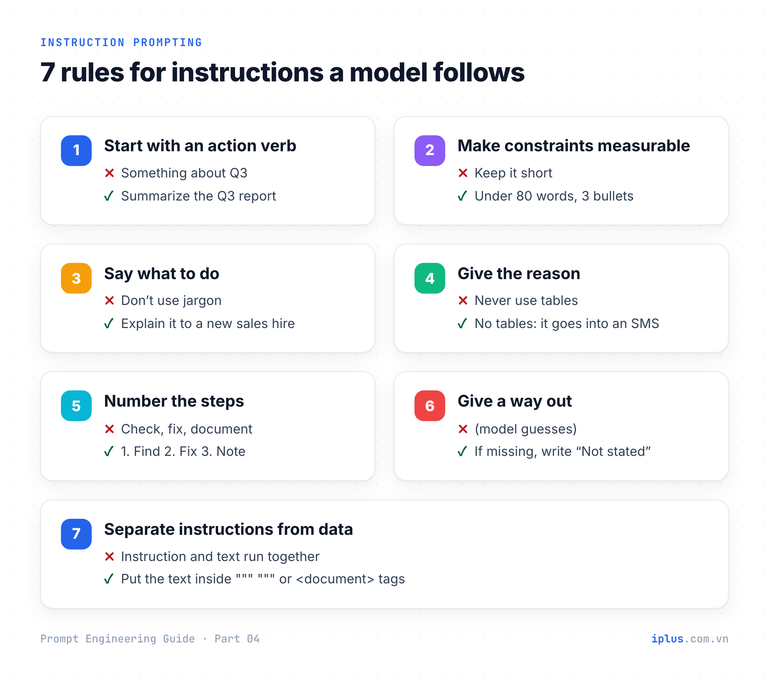
Rule | Weak | Strong |
|---|---|---|
1. Start with an action verb | Something about our Q3 numbers | Summarize the Q3 sales report |
2. Make constraints measurable | Keep it short | Under 80 words, 3 bullets |
3. Say what to do, not only what to avoid | Don’t use jargon | Explain it as you would to a new sales hire |
4. Give the reason behind a rule | Never use tables | No tables: this text is pasted into SMS |
5. Number steps when order matters | Check, fix and document it | 1. Find the error 2. Fix it 3. Write one line of release notes |
6. Give the model a way out | (nothing) | If the date is missing, write “Not stated” |
7. Separate instructions from data | Instruction and text run together | Text inside """ """ or <document> tags |
Rule 4 deserves attention. Anthropic’s example replaces “NEVER use ellipses” with the reason: the response will be read aloud by a text-to-speech engine that cannot pronounce them. With the reason, the model also avoids other things a speech engine would stumble on. Rule 7 is covered in depth in Prompt structure: the five parts of a prompt.
Layer the instruction: task, audience, format, constraints
You rarely write the perfect instruction in one go. Start from the bare task and add one layer at a time. The sample below shows the finished result of that process for turning an internal changelog into customer release notes. Replace the changelog with your own.
Rewrite the engineering changelog below as release notes for customers.

Audience: non-technical admins of our HR software.
Format: a title, then 3 to 5 bullets. Each bullet starts with the benefit, then the change.
Constraints:
- Under 100 words in total.
- Leave out ticket numbers and refactoring work. Customers cannot see them, and they add noise.
- If a change needs an admin action, end that bullet with "Action needed:" and the step.

Changelog:
"""
- PAY-2231 add bulk CSV import for employee leave balances
- refactor auth middleware (no user impact)
- fix: timezone bug caused shift times to show 1h late for UTC+7 users
- PAY-2240 SSO: support Okta SCIM provisioning; admins must enable in Settings > Security
"""What's new in this release
- Set up faster: import leave balances for all employees at once from a CSV file.
- See the right shift times: we fixed a bug that showed shifts one hour late for users in UTC+7.
- Manage users automatically: Okta users can now be added and removed through SCIM provisioning. Action needed: turn it on in Settings > Security.Sample output: wording varies between runs and models
Every line of the instruction is visible in the output: the refactoring entry is gone, each bullet leads with a benefit, and the one change that needs an admin action says so.
Completion, question or instruction: choose the shape
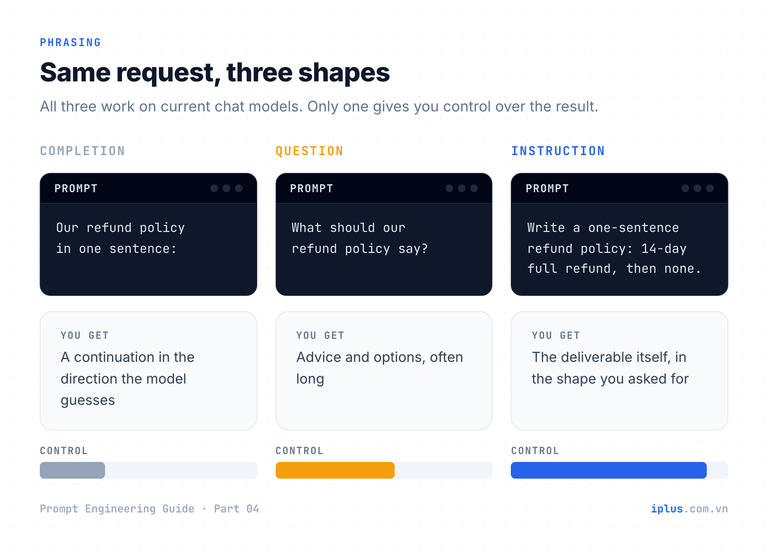
The same request can be phrased in three shapes, and each produces a different kind of answer. Current chat models handle all three, but they do not give you the same control.
Shape | Example | What you usually get | Use it when |
|---|---|---|---|
Completion | Our refund policy in one sentence: | A continuation in whatever direction the model guesses | You want to see how the model would continue a text |
Question | What should our refund policy say? | Advice and options, often long | You are exploring and do not know the answer yet |
Instruction | Write a one-sentence refund policy: … | The deliverable itself, in the shape you asked for | You know what you want |
Write a one-sentence refund policy for a SaaS product.
Terms: full refund within 14 days of purchase, no refunds after that.
Tone: plain and friendly. No legal jargon.If you're not happy with your purchase, you can get a full refund within 14 days; after that, we're unable to offer refunds.Sample output: wording varies between runs and models
Tip: when you are still exploring, ask a question first, then turn the best idea from the answer into an instruction.
What is role prompting, and what can it change?
Role prompting gives the model a persona, usually as “You are a …”. A role changes the register: vocabulary, tone, how much detail it includes, what it notices first and how it structures the answer. Anthropic’s current guide describes it the same way: setting a role in the system prompt “focuses Claude’s behavior and tone for your use case.”
What a role does not reliably change is factual accuracy. Zheng et al. (Findings of EMNLP 2024) tested 162 personas covering 6 types of interpersonal relationships and 8 domains of expertise, on 4 families of models and 2,410 factual questions. Adding a persona to the system prompt did not improve performance compared with no persona, and the effect of any single persona was “largely random.” Telling a model it is a world-class doctor does not give it medical knowledge it lacks.
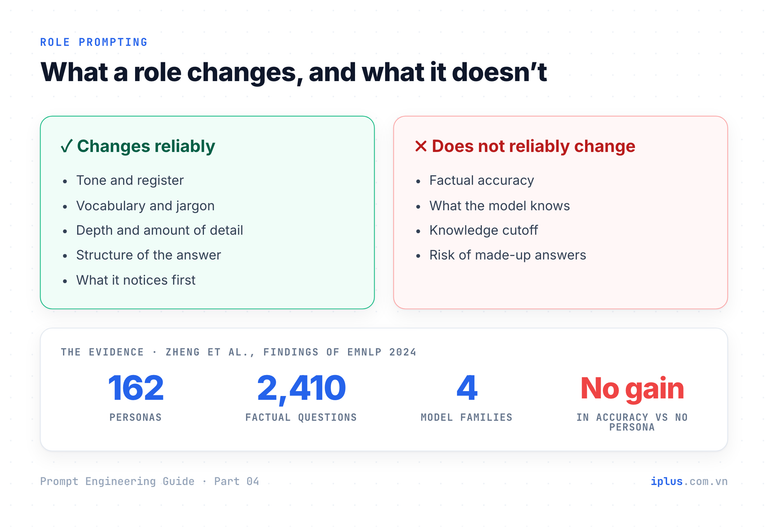
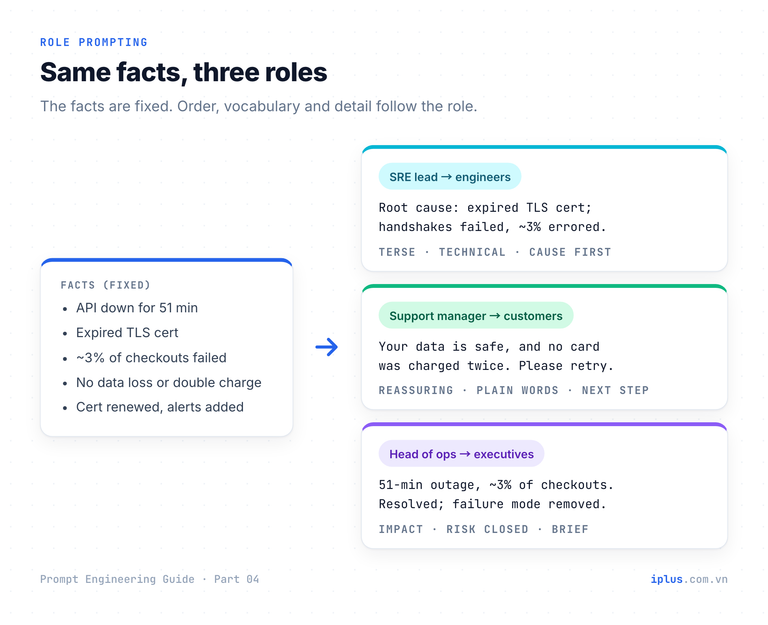
So use roles to control how an answer is written, and use source material, examples and verification to control whether it is right. The sample below makes the point: the facts are fixed, only the role changes. Replace {role} and {audience} with each pair from the table.
You are {role}.
Write a message about the incident below for {audience}. Keep it under 90 words.

Facts (use only these):
- Payment API outage on 14 October, 09:12 to 10:03 UTC (51 minutes).
- Cause: an expired TLS certificate on the payment gateway.
- About 3% of checkout attempts failed. No data was lost and no card was charged twice.
- Fix: certificate renewed; automated expiry alerts added.
{role} | {audience} |
|---|---|
the SRE lead | the engineering team’s incident channel |
the customer support manager | affected customers, by email |
the head of operations | the executive team, in a short briefing |
SRE lead, engineering channel:
Incident: payment API, 14 Oct 09:12-10:03 UTC (51 min).
Root cause: expired TLS certificate on the payment gateway; handshakes failed and ~3% of checkout attempts errored.
Impact: no data loss, no double charges.
Remediation: certificate renewed; automated expiry alerts now in place.
Sample output: wording varies between runs and models
Customer support manager, email to customers:
Subject: Checkout issue on 14 October, now resolved

On 14 October between 09:12 and 10:03 UTC, some payments could not be completed. Your data is safe, and no card was charged twice. If your payment did not go through, please try again; checkout is working normally. We have fixed the cause and added alerts so it does not happen again. We're sorry for the inconvenience.
Sample output: wording varies between runs and models
Head of operations, executive briefing:
51-minute payment outage on 14 Oct (09:12-10:03 UTC), caused by an expired security certificate. About 3% of checkout attempts failed; no data loss and no double charges. Resolved the same morning. Certificate expiry is now monitored automatically, which removes this failure mode.Sample output: wording varies between runs and models
How to write a role prompt that works
“You are an expert marketer” is a weak role: it sets a vague tone and nothing else. A useful role answers four questions: who is speaking, to whom, for what purpose, and within which limits. The audience and constraints usually do more work than the job title.
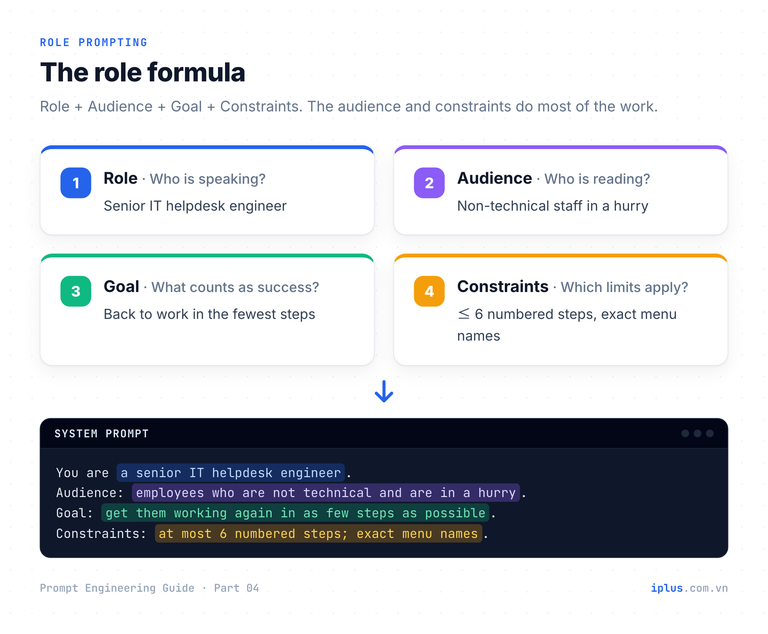
The role below is written for an IT helpdesk assistant. Paste it into the system prompt, or into ChatGPT’s custom instructions, a Claude Project’s instructions or a Gemini Gem, so it applies to every message in the conversation.
You are a senior IT helpdesk engineer at a 200-person company.
Audience: employees who are not technical and are often in a hurry.
Goal: get them working again in as few steps as possible.
Constraints:
- Give numbered steps, one action per step, at most 6 steps.
- Use the exact button and menu names they will see on screen.
- If a step needs admin rights, write "Ask IT to do this step" instead of explaining it.
- If you are not sure which device or app version they use, ask one short question first.
The user then writes: “Outlook keeps asking for my password since this morning.”
Quick question first: are you using Outlook on a Windows PC, on a Mac, or in a web browser?Sample output: wording varies between runs and models
After the user answers “Windows”:
1. Close Outlook completely.
2. Open the Start menu, type "Credential Manager" and open it.
3. Click "Windows Credentials".
4. Find each entry that mentions "MicrosoftOffice", click it and choose "Remove".
5. Open Outlook again and sign in with your work email and password.
6. If it still keeps asking, your password may have expired. Ask IT to do this step.
Sample output: wording varies between runs and models
Every constraint shows up in behaviour: one clarifying question, six steps, exact Windows labels and a hand-off for the admin task. If you call a model through an API, the role goes in the system parameter. This Python example uses the Anthropic SDK; any chat model with a system prompt works the same way.
# pip install anthropic   (and set the ANTHROPIC_API_KEY environment variable)
import anthropic

ROLE = """You are a senior IT helpdesk engineer at a 200-person company.
Audience: employees who are not technical and are often in a hurry.
Goal: get them working again in as few steps as possible.
Constraints:
- Give numbered steps, one action per step, at most 6 steps.
- Use the exact button and menu names they will see on screen.
- If a step needs admin rights, write "Ask IT to do this step" instead of explaining it.
- If you are not sure which device or app version they use, ask one short question first."""

client = anthropic.Anthropic()
message = client.messages.create(
    model="claude-sonnet-5",
    max_tokens=1024,
    system=ROLE,  # the role applies to every turn of the conversation
    messages=[
        {"role": "user", "content": "Outlook keeps asking for my password since this morning."}
    ],
)
# Text blocks only: newer models may return a thinking block first.
print("".join(b.text for b in message.content if b.type == "text"))
Combine role and instruction in one prompt
Most real prompts use both: the role sets the voice, the instruction sets the task and the shape of the result. The template below keeps them in separate, labelled blocks so you can change one without breaking the other. Fill in every {placeholder}.
# Role
You are {who is speaking}, writing for {audience}.

# Task
{Action verb} {what}, so that {purpose}.

# Rules
1. {A measurable constraint, e.g. "Under 120 words"}
2. {What to do instead of what to avoid}
3. If {an edge case}, {what to do instead of guessing}.

# Input
"""
{your text, data or code}
"""
Here is the template filled in for a code-review explanation. The role sets a mentoring tone; the rules keep the answer focused on one change.
# Role
You are a senior backend engineer mentoring a junior developer.

# Task
Explain what this MySQL 8 query does and the single change that would most improve its performance, so the developer learns the principle, not just the fix.

# Rules
1. Under 150 words.
2. Show the rewritten part of the query.
3. If more than one change matters, mention the second one in a single "Next to learn:" line.

# Input
"""
SELECT *
FROM orders
WHERE YEAR(created_at) = 2025
  AND status = 'paid'
ORDER BY created_at DESC;
"""What it does: returns every paid order created in 2025, newest first, with all columns.
The one change: rewrite the date filter as a range.
WHERE created_at >= '2025-01-01'
AND created_at < '2026-01-01'
AND status = 'paid'
Why: wrapping created_at in YEAR() makes MySQL evaluate the function on every row, so it cannot use an index on created_at. A plain range on the column can use that index and read only the 2025 rows. On a large orders table, that is often the difference between a full scan and an index range scan.
Next to learn: select only the columns you need instead of SELECT *.Sample output: wording varies between runs and models
When an instruction alone cannot describe the format you need, add examples instead of more words. That is the subject of Zero-shot, one-shot and few-shot prompting. To keep a role and rules active across a long conversation, see Combining techniques, priming and iteration.
Common mistakes with instructions and roles
Mistake | Why it fails | Fix |
|---|---|---|
“Be concise”, “make it professional” | The model’s idea of concise is not yours | Give a number and an audience: “Under 80 words, for the CFO” |
Only negative rules | It knows what to avoid, not what to produce | State the target: “Write flowing paragraphs” instead of “No bullet points” |
A role as an accuracy booster | Personas do not reliably improve factual answers | Supply source text, ask it to quote it, verify the result |
20 rules with equal weight | Important rules get diluted; some conflict | Put must-haves first, remove duplicates, keep each rule testable |
No way out for missing data | The model fills gaps with plausible guesses | “If it is not in the text, write Not stated” |
Instructions mixed into pasted data | The model may treat data as commands | Wrap data in """ """ or XML tags |
Repeating the role in every message | Easy to forget or change mid-conversation | Set it once in the system prompt or custom instructions |
FAQ
What is the difference between instruction prompting and role prompting?
Instruction prompting tells the model what to do: the task, format and constraints. Role prompting tells it who is speaking and for whom, which mainly changes tone, vocabulary and depth. Most good prompts use a short role and a precise instruction together.
Does “You are an expert” make AI answers more accurate?
Not reliably. A study of 162 personas on 2,410 factual questions found no improvement over prompts without a persona. Roles are useful for style and focus; accuracy comes from good source material, clear instructions and checking the output.
Should the role go in the system prompt or the user message?
Put a role you want for the whole conversation in the system prompt, or in your chatbot’s custom instructions or project settings. Put task-specific instructions in the user message, where you can change them turn by turn.
How long should a prompt instruction be?
As long as it takes to remove guesswork, and no longer. A one-line request is fine for a simple task; a reusable workflow may need ten numbered rules. If you can delete a rule without changing the output, delete it.
Sources and further reading
- Learn Prompting: Instructions in Prompts
- Learn Prompting: Roles in Prompts
- Learn Prompting: Tips for Writing Better Prompts
- Wei et al. (2021), Finetuned Language Models Are Zero-Shot Learners (FLAN)
- Ouyang et al. (2022), Training language models to follow instructions with human feedback
- Zheng et al. (2024), When “A Helpful Assistant” Is Not Really Helpful: Personas in System Prompts Do Not Improve Performances of Large Language Models
- Anthropic: Prompting best practices
- Microsoft Presidio: PII detection and anonymization
Prompt Engineering Guide: all parts
← Previous: Part 3: Prompt structure: the five parts of a prompt · Next: Part 5: Zero-shot, one-shot and few-shot prompting →
Read Parts 1–6 in order: each builds on the one before. Parts 7–10 apply them and can be read in any order once you have the basics.
- Part 1: What prompt engineering is, and why it matters
- Part 2: How LLMs work: generative AI basics
- Part 3: Prompt structure: the five parts of a prompt
- Part 4: Instruction and role prompting (you are here)
- Part 5: Zero-shot, one-shot and few-shot prompting
- Part 6: Combining techniques, priming and iteration
- Part 7: Prompts for summaries, tables and document analysis
- Part 8: Prompts for emails, blog posts and marketing
- Part 9: Prompts for coding assistants
- Part 10: Build a knowledge-base chatbot (RAG)
Need help with this?
Explore the iPlus Solution services most relevant to this article.