Prompt Engineering Guide · Part 1 of 10. Start here. Parts 1–6 build on each other, so read them in order; parts 7–10 apply them to everyday work. Next: Part 2: How LLMs work: generative AI basics.
Prompt engineering is the practice of designing the input to a generative AI model so that it reliably produces the output you need. It sounds like a niche skill for AI specialists. In practice it decides whether ChatGPT, Claude, Gemini or a coding agent saves you an hour or costs you one.
Everyone who uses these tools has seen both outcomes. One request returns something you can ship. A similar request returns generic text, invented details or code that solves the wrong problem. The model was the same both times. The prompt was not.
This guide explains what a prompt is, what turns prompt writing into engineering, and why the skill matters even more now that AI agents read instruction files, call tools and work for minutes or hours on their own. Every section has a sample you can copy, run and adapt.
What is a prompt?
A prompt is everything the model reads before it answers. In a chat window that looks like your message. Underneath, it usually also includes a system prompt written by the app, earlier messages in the conversation, files you attached and, in agents, descriptions of the tools the model may call.
A useful prompt carries four kinds of content: an instruction (what to do), context (the facts and material to work from), examples (what good looks like) and an output format (the shape of the answer). Short prompts can still have all four. Replace the ticket text with any ticket from your own system:
Summarize this support ticket for the on-call engineer.
Use exactly 3 bullets: Impact, Likely cause, Next step.
If the ticket does not say something, write "unknown".

Ticket:
"""
Since 09:40 customers in Singapore get "502 Bad Gateway" on checkout.
Other regions are fine. We deployed payment-service v3.8.1 at 09:35.
About 120 failed orders so far.
"""- Impact: Checkout fails with 502 for customers in Singapore since 09:40; about 120 failed orders. Other regions unaffected.
- Likely cause: payment-service v3.8.1, deployed at 09:35, five minutes before the errors began.
- Next step: Roll back payment-service to the previous version in the Singapore region and confirm checkout recovers.Sample output: wording varies between runs and models
The instruction names the reader and the task, the delimiters (""") separate the material from the request, and the format rule makes the answer scannable. The "unknown" rule tells the model what to do when information is missing, instead of letting it guess.
What is prompt engineering?
Prompt engineering is designing, testing and refining prompts until a model produces the output you need, consistently. The last word is the difference between writing a prompt and engineering one. A prompt that worked once is a lucky message. A prompt that works on the next fifty inputs is a component you can rely on.
The field is large. The Prompt Report, a 2024 survey by researchers from the University of Maryland, OpenAI, Stanford and others, catalogues 58 text prompting techniques and 40 more for other modalities. You do not need most of them. You need the loop below and a handful of core techniques, which the rest of this series covers.
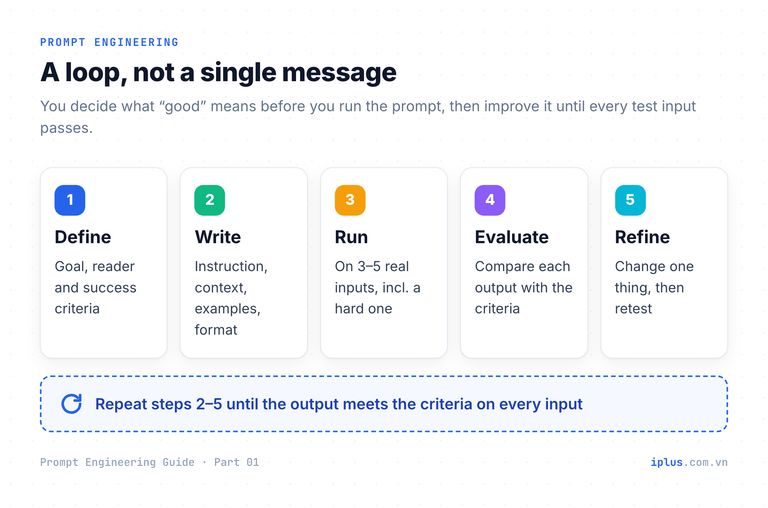
Writing a prompt | Engineering a prompt | |
|---|---|---|
Goal | Get an answer now | Get the right answer every time |
Success criteria | In your head | Written down before you run it |
Testing | One try | Several real inputs, including edge cases |
When it fails | Retry with other words | Find the cause, change one thing, re-test |
Lifetime | One chat | Saved, shared, versioned like code |
A fast way to start engineering: ask the model to review your prompt the way a new colleague would. Anthropic's prompting guide calls this the golden rule: if a colleague with minimal context would be confused, the model will be too. Paste any prompt you reuse:
Act as a strict reviewer of the prompt below. A new colleague with no
background will use it. List:
1. Ambiguities: words or requirements that could be read two ways.
2. Missing facts: things the prompt assumes the reader already knows.
3. Missing success criteria: how would we know the output is right?
Then rewrite the prompt to fix these. Keep my intent; do not add new goals.

Prompt:
"""
{paste your prompt}
"""1. Ambiguities
- "Short summary": no length given. Two sentences or two paragraphs?
- "The team": which team? The output tone depends on it.
2. Missing facts
- The release date and the plan tiers the features apply to.
3. Missing success criteria
- No rule for what must be included, so you cannot check the result.
Rewritten prompt:
"Write a summary of under 80 words for the customer success team ..."
(trimmed)Sample output: wording varies between runs and models
Same model, very different results
The quickest way to see why prompt engineering matters is to give one model the same job twice. Here is a request every software team makes: customer-facing release notes.
Write release notes for our new version.# Release Notes – Version 2.0
We're excited to announce the latest version of our product! This
release brings powerful new features, performance improvements and
important bug fixes.
## New Features
- **Dark Mode**: A sleek new look that's easier on the eyes.
- **Enhanced Dashboard**: Get insights faster than ever.
...
(trimmed)Sample output: wording varies between runs and models
Nothing in that output is usable. The model did not know the product, the changes or the reader, so it produced a template and filled it with features that do not exist. That is not a model failure; it is the only sensible answer to an empty request. Now the same task with the facts and the reader spelled out:
You are writing customer-facing release notes for Taskflow, a B2B
project-management app.

Audience: team admins at small companies. They are not developers.
They want to know what changes for their team and whether they must act.

Facts (use only these; do not add features):
- Version 4.2 is available on 12 November.
- New: single sign-on (SAML) with Okta and Microsoft Entra ID. Business plan only.
- New: export the audit log to CSV. All paid plans.
- Fixed: some users in UTC+7 to UTC+9 got due-date reminders twice.
- Action required: none. Single sign-on stays off until an admin enables it.

Format:
- A title of at most 8 words, then a one-sentence summary
- Sections: "New", "Fixed", "Do I need to do anything?"
- Plain language, no marketing superlatives, under 150 wordsTaskflow 4.2: Single Sign-On and Audit Log Export
Taskflow 4.2, available on 12 November, adds single sign-on for the
Business plan and audit log export for every paid plan.
New
- Single sign-on (SAML) with Okta and Microsoft Entra ID, on the Business plan.
- Export your audit log to CSV on any paid plan.
Fixed
- Some users in time zones UTC+7 to UTC+9 received due-date reminders
twice. Each reminder is now sent once.
Do I need to do anything?
No. Single sign-on stays off until an admin enables it.Sample output: wording varies between runs and models
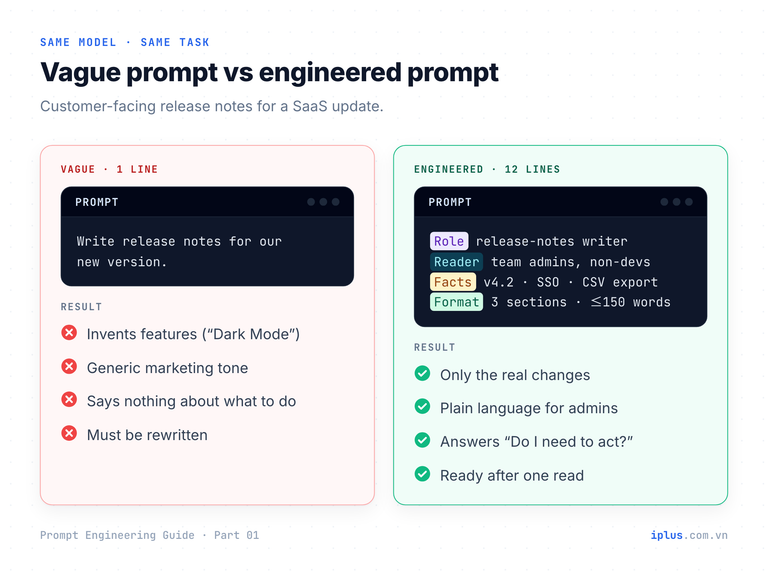
The second prompt took two minutes longer to write. It saved the rewrite, the fact-check of invented features and the risk of publishing them. That trade, minutes of specification against an hour of rework, is the whole economic case for prompt engineering.
Why every engineer and AI user needs prompt engineering
A large language model is general-purpose by design. It knows language, code and a great deal of public knowledge. It does not know your goal, your reader, your facts, your constraints or what "done" means for this task. Those five things exist only in your head, and the prompt is the only way to move them into the model's input.
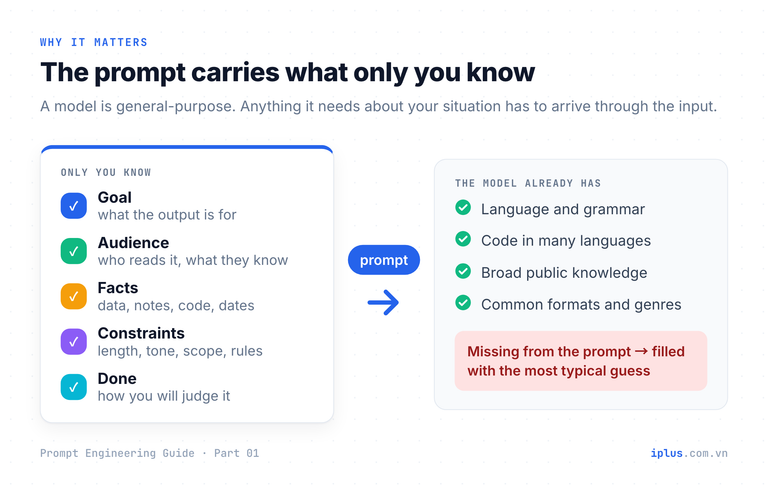
That makes the prompt a specification, and it fails the way specifications fail:
- Ambiguity in, guesswork out. Whatever you leave open, the model fills with the most typical answer. Typical is rarely what your situation needs.
- Missing facts become invented facts. Asked about something it was not given, a model tends to produce a plausible answer rather than admit the gap. Part 2 explains why.
- Rework is the hidden cost. Each vague round trip costs reading time, correction time and, in code, debugging time. It compounds across a team.
This applies to a developer asking for a migration script, an accountant asking for a reconciliation formula and a manager asking for a project update. When you are not sure what the model needs, let it tell you. This prompt works for almost any deliverable:
I need {describe the deliverable, e.g. "a one-page onboarding guide for
new backend engineers"}.

Before you write anything, ask me up to 5 questions whose answers would
most change the result: audience, purpose, facts that must be included,
constraints, and format. Number the questions. Wait for my answers and
do not draft until I reply.Happy to help. Before drafting, a few questions:
1. Who will read it: new graduates, or experienced engineers new to the company?
2. What should they be able to do by the end of week one?
3. Which systems must it cover (repos, CI/CD, environments, on-call)?
4. Are there rules they must know on day one, such as security or code review policy?
5. Format: a checklist, a narrative page, or a table by day?Sample output: wording varies between runs and models
Tip: Answer the questions in one message, then say "Now write it." You have just turned a vague request into a specification without having to know in advance what to include.
Prompt engineering in the age of AI agents
An AI agent is a model that uses tools in a loop: it reads files, runs commands, searches, edits and decides its next step on its own. Coding agents such as Claude Code, Cursor or GitHub Copilot work this way, and so do many support and data agents. With an agent, the message you type is the smallest part of what the model reads.
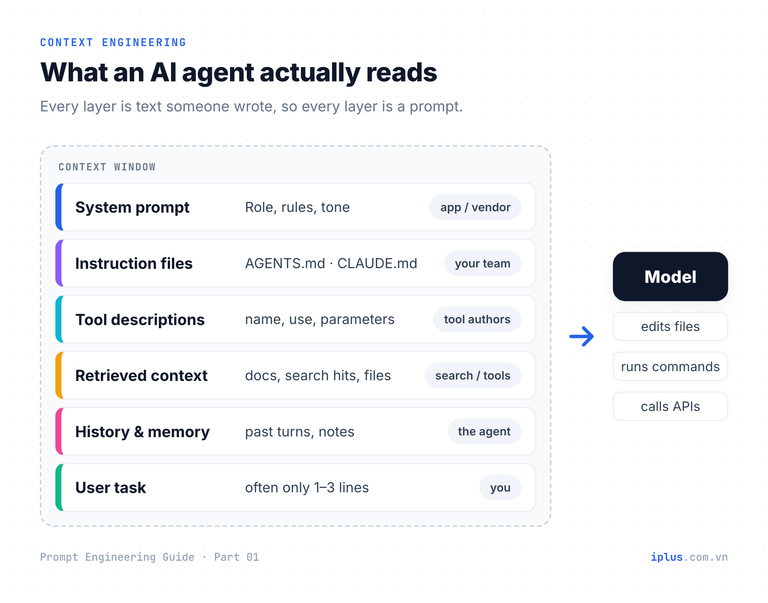
Anthropic describes context engineering as the natural progression of prompt engineering: curating the whole set of tokens the model sees, including system instructions, tools, external data and message history, not just the prompt you type. Every one of those layers is written by someone. The system prompt, the tool descriptions and the project instruction file are all prompts, read on every step.
Instruction files are the most visible example. Many coding agents read an AGENTS.md file, described by its maintainers as "a README for agents"; Claude Code reads CLAUDE.md at the start of every session. A short, precise file changes the behaviour of every task that follows:
# AGENTS.md

## Project
Invoice API. Node.js 22, TypeScript (strict), PostgreSQL 16.

## Commands
- Install: pnpm install
- Test: pnpm test   (must pass before you report a task as done)
- Lint: pnpm lint

## Rules
- Money is stored as integer cents. Never use floating point for amounts.
- Every new endpoint needs a Zod schema and at least one test.
- Never edit files in src/migrations/ by hand. Run pnpm db:migrate:create.

## Ask first
Ask before deleting data, changing a public API, or adding a dependency.
Each rule exists because without it the agent would make a reasonable but wrong guess: floats for money, an untested endpoint, a hand-edited migration. Tool descriptions work the same way. The text below is what the model reads when deciding whether and how to call a tool, so it is a prompt too:
{
  "name": "search_invoices",
  "description": "Search invoices by customer ID and date range. Use this before answering any question about amounts owed. Returns at most 20 invoices, newest first. Amounts are integer cents.",
  "input_schema": {
    "type": "object",
    "properties": {
      "customer_id": { "type": "string" },
      "from": { "type": "string", "description": "ISO date, inclusive" },
      "to": { "type": "string", "description": "ISO date, inclusive" }
    },
    "required": ["customer_id"]
  }
}
The stakes are higher than in chat. A vague chat answer costs one rewrite. A vague instruction to an agent is repeated across dozens of steps, and agents act: they edit files, send requests and change data. A spec error multiplies before you see it.
Why the skill does not fade as models improve
A common claim is that smarter models will make prompt engineering obsolete. Part of that is true, and it is worth separating from the part that is not.
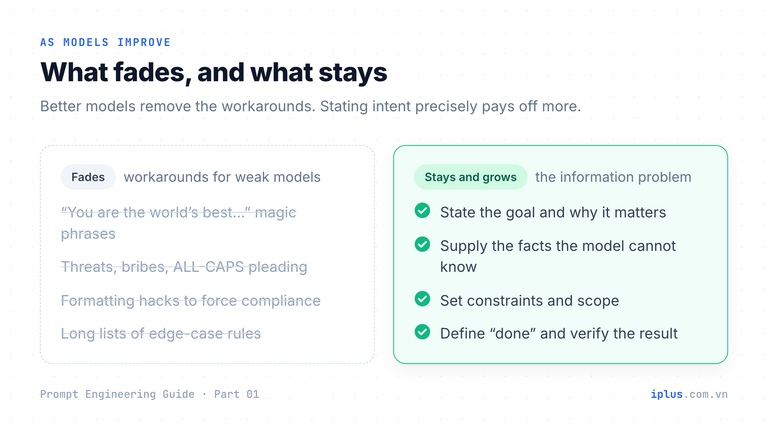
What fades is the workaround layer: magic phrases, threats, elaborate formatting tricks and long lists of rules that compensated for weak models. Anthropic notes in the same context-engineering post that smarter models need less prescriptive engineering. Good.
What stays is the information problem, and three trends make it more important:
- A model cannot infer what you never said. No amount of intelligence recovers your release date, your budget, your customer's contract terms or your team's conventions. Those facts have to be in the input.
- Better instruction-following raises the payoff of precise instructions. Current models do more literally what they are told. Anthropic's guide advises asking explicitly if you want "above and beyond" behaviour rather than expecting the model to infer it. A precise prompt now gets a precise result; a vague one gets a literal reading of vague.
- Delegation is getting longer. As agents work for hours, the human's job shifts from writing each step to stating the goal, constraints, success criteria and checks up front. That is prompt engineering at the scale of a project brief.
The practical habit that follows: every time you hand work to a model or an agent, write down what "done" means. This block works at the end of any task prompt:
Task: {what to do, e.g. "add CSV export to the /reports endpoint"}

Done means:
- {observable check 1, e.g. "pnpm test passes"}
- {observable check 2, e.g. "the CSV opens in Excel with UTF-8 headers"}

Out of scope: {what must not change, e.g. "the JSON response format"}

If you cannot meet a check, stop and report why. Do not work around it.Done:
- Added GET /reports/export?format=csv with a UTF-8 BOM so Excel reads the headers.
- pnpm test passes (3 new tests).
Not changed: the JSON response of GET /reports.
Note: very large reports (over 100k rows) take about 8 s. I did not add
streaming because it was out of scope. Want me to?Sample output: wording varies between runs and models
A reusable prompt template to start today
Most good prompts answer the same questions. The template below puts them in order. Fill in the braces, delete any section that does not apply, and keep the facts block whenever accuracy matters. Part 3 explains each part and the order in detail.
# Role
You are {role, e.g. "an HR operations specialist"}.

# Goal
I need {deliverable} so that {what the reader will do with it}.

# Audience
{who reads it and what they already know}

# Facts
Use only the facts below. If something needed is missing, say so instead of guessing.
"""
{paste facts, notes, data or code}
"""

# Constraints
- Length: {e.g. "under 120 words"}
- Tone: {e.g. "friendly, plain, no jargon"}
- Must include / must avoid: {...}

# Output format
{e.g. "a Slack message with a bold first line and 3 bullets"}

# Check
Before answering, check the result against the constraints and list any assumption you made.
Filled in for a Slack announcement about a new remote-work policy, the template returned:
*New remote-work policy from 1 December* 🏠

- You can work remotely up to 3 days a week.
- Core hours are 10:00–15:00 (ICT); please be reachable then.
- Book next week's remote days in the HR portal by Thursday.

Questions? Reply in this thread or message the HR team.

Assumptions: none. All details come from the facts provided.
Sample output: wording varies between runs and models
Common mistakes and how to fix them
Mistake | What happens | Fix |
|---|---|---|
No facts, only a topic | The model invents plausible details | Paste the facts and say "use only these" |
No reader named | Wrong depth and tone | State who reads it and what they already know |
No format | Long prose you must restructure | Specify sections, bullets, table or JSON |
Several tasks in one sentence | Some get skipped | Number the steps or split into separate prompts |
Judging on one try | A lucky output hides a weak prompt | Test on 3–5 real inputs, including a hard one |
Blaming the model first | You switch tools and the problem stays | Ask what the prompt failed to say, then change one thing |
The first mistake is the most expensive, because invented details look exactly like real ones. Add one line that makes gaps visible instead of filled:
Use only the facts below. If a detail you need is not in them, write
[MISSING: what you need] in its place instead of guessing.

Facts:
"""
{paste facts}
"""The webinar starts at 15:00 ICT on [MISSING: date] and runs for 45
minutes. Register at [MISSING: registration link].Sample output: wording varies between runs and models
What this Prompt Engineering Guide covers
The series has ten parts. Read them in order if you are new, or jump to the application you need. Each one follows the format of this article: short explanations and samples you can copy.
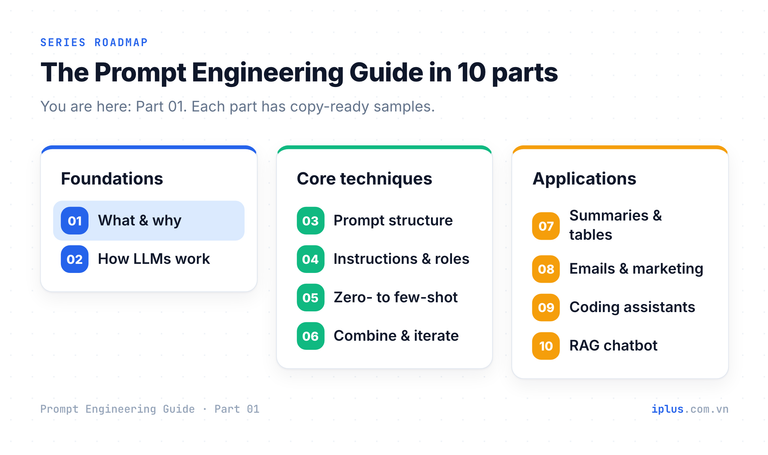
- Foundations. This article, then how LLMs work: tokens, context windows, chatbots versus raw models, and the limits you must design around.
- Core techniques. Prompt structure, instructions and roles, zero-shot to few-shot examples, and combining techniques with priming and iteration.
- Applications. Summaries, tables and document analysis, emails, blog posts and marketing, coding assistants, and a knowledge-base chatbot with RAG.
FAQ
Is prompt engineering still relevant with newer AI models?
Yes. Newer models need fewer tricks, but they still cannot know your goal, facts, constraints or definition of done unless you state them. As agents take on longer tasks, stating those clearly matters more.
Do I need to know how to code to learn prompt engineering?
No. Most techniques are about writing clear instructions and supplying the right material. Coding helps when you build prompts into applications, which Parts 9 and 10 cover.
What is the difference between prompt engineering and context engineering?
Prompt engineering focuses on writing the instructions. Context engineering covers everything the model sees at each step, including tools, retrieved documents and history. Context engineering includes prompt engineering; it does not replace it.
Does the same prompt work in ChatGPT, Claude and Gemini?
Clear prompts transfer well between models because they rely on information, not on quirks. Wording, length and formatting preferences differ slightly, so test an important prompt on the model you will actually use.
Sources and further reading
- Learn Prompting: Prompt Engineering Guide (introduction)
- Learn Prompting: Introduction to Prompt Engineering
- Schulhoff et al., The Prompt Report: A Systematic Survey of Prompt Engineering Techniques (arXiv:2406.06608)
- Anthropic: Effective context engineering for AI agents
- Anthropic: Prompting best practices for Claude
- OpenAI: Prompt engineering guide
- Google: Gemini prompt design strategies
- AGENTS.md: an open format for guiding coding agents
- Claude Code: Manage Claude's memory (CLAUDE.md)
Prompt Engineering Guide: all parts
Next: Part 2: How LLMs work: generative AI basics →
Read Parts 1–6 in order: each builds on the one before. Parts 7–10 apply them and can be read in any order once you have the basics.
- Part 1: What prompt engineering is, and why it matters (you are here)
- Part 2: How LLMs work: generative AI basics
- Part 3: Prompt structure: the five parts of a prompt
- Part 4: Instruction and role prompting
- Part 5: Zero-shot, one-shot and few-shot prompting
- Part 6: Combining techniques, priming and iteration
- Part 7: Prompts for summaries, tables and document analysis
- Part 8: Prompts for emails, blog posts and marketing
- Part 9: Prompts for coding assistants
- Part 10: Build a knowledge-base chatbot (RAG)
Need help with this?
Explore the iPlus Solution services most relevant to this article.