Prompt Engineering Guide · Part 7 of 10. An applications part: it assumes the basics from Parts 1–6. New to the series? Start with Part 1: What prompt engineering is, and why it matters.
Most office work is reading: reports, meeting notes, contracts, policies. AI prompts for summaries, tables and document analysis are among the most useful skills in this series, and also where a careless prompt does quiet damage: a summary that drops the number that mattered, or a figure copied wrong.
Below are copy-ready prompts for eight jobs, from summaries and action items to number checks and contract review, each with a sample output and the reason it works.
They work in ChatGPT, Claude and Gemini and use delimiters (such as <document>) and explicit output formats; if those are new, read Prompt structure: the five parts of a prompt first.
Summary prompts: control audience, length, format and focus
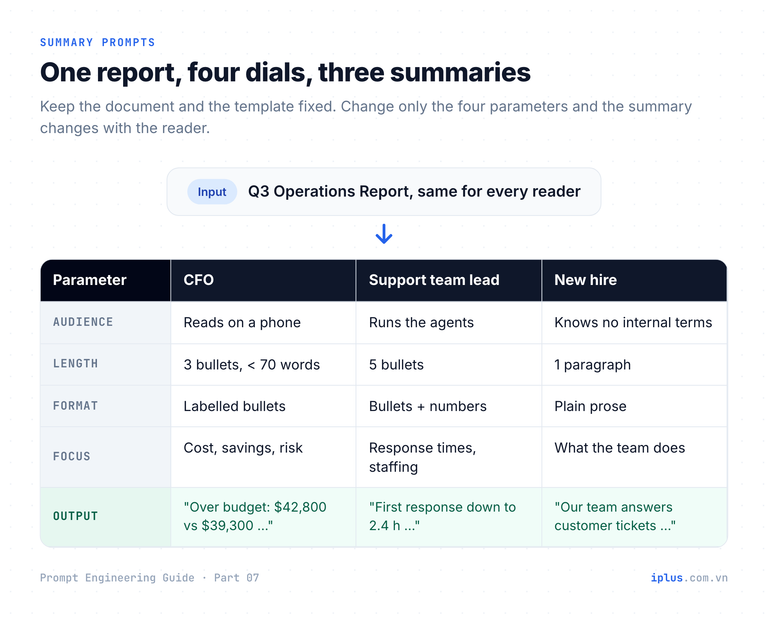
A summary is only useful to a particular reader. "Summarize this" makes the model guess, so you get a generic overview. Name four things instead: the audience, the length, the format and the focus.
Put the document first and the instructions after it. Anthropic's prompting guide recommends placing long documents above the query. Here is the sample document used throughout this article:
Q3 2026 Operations Report: Support Platform

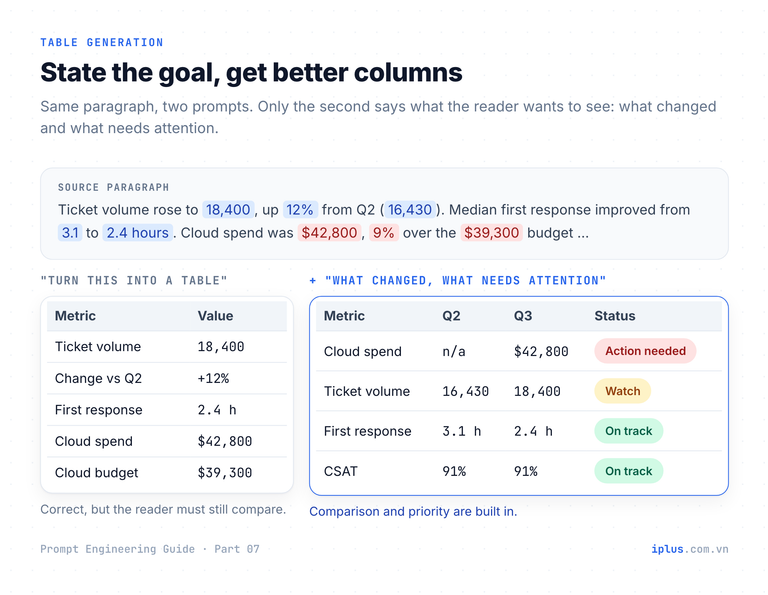
Ticket volume rose to 18,400, up 12% from Q2 (16,430). Median first-response time improved from 3.1 hours to 2.4 hours after we added a weekend shift in July. Customer satisfaction (CSAT) held at 91%. Cloud spend was $42,800, 9% over the $39,300 budget, mainly because log storage grew faster than planned. Two incidents breached the 99.9% uptime SLA: a 47-minute database failover on August 14 and a 22-minute DNS outage on September 3. Headcount stayed at 14 agents; one senior agent resigned in September and the role is open. Next quarter we plan to move logs older than 30 days to cold storage, which should save about $3,000 per month.
The template. Replace the four values in curly braces:
<document>
{paste the document here}
</document>

Summarize the document above.
- Audience: {who will read it, and what they already know}
- Length: {e.g. 3 bullet points, or under 80 words}
- Format: {e.g. bullets, one paragraph, a short email}
- Focus: {what this reader cares about; leave out the rest}

Use only facts stated in the document. Keep every number exactly as written.
If something this audience would need is missing, say so in one final line starting with "Missing:".
Filled in for the CFO (audience: "the CFO, reads on a phone"; length: "3 bullets, under 70 words"; format: "bullets, each starting with a short label"; focus: "cost vs budget, savings, financial exposure"):
- Over budget: Q3 cloud spend was $42,800, 9% above the $39,300 budget, mainly because log storage grew faster than planned.
- Savings plan: moving logs older than 30 days to cold storage next quarter should save about $3,000 per month.
- Risk: two incidents (47 and 22 minutes) breached the 99.9% uptime SLA, and one senior support role is open.

Missing: the report does not say whether the SLA breaches trigger customer credits.
Sample output: wording varies between runs and models
Tip: "Keep every number exactly as written" matters. Without it, models often round figures ("about $43K"), which is wrong in a report someone will forward.
Turn meeting notes into decisions and action items
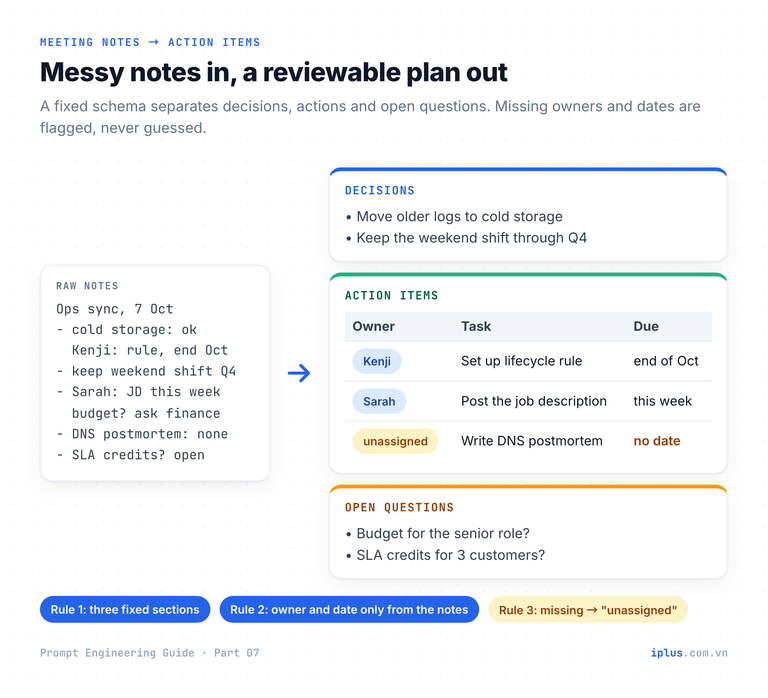
Notes mix three things: what was decided, who does what by when, and what is still open. Ask for them as separate sections with a fixed schema, plus one rule for gaps: if no owner or date is named, write "unassigned" or "no date". Otherwise a model fills gaps with plausible guesses. The Source column lets you delete any row the notes don't support.
Replace {notes} with your raw notes or a pasted email thread:
<notes>
{notes}
</notes>

From the notes above, produce three sections.

## Decisions
Bullet list of what was agreed. One line each.

## Action items
A Markdown table with columns: Owner | Task | Due date | Source
- Owner and Due date must come from the notes. If not stated, write "unassigned" or "no date". Never guess.
- Source: a short quote (max 10 words) from the notes that supports the row.

## Open questions
Anything raised but not resolved.
Sample notes to try it with:
Ops sync, 7 Oct. Minh, Sarah, Kenji, Lan
- cold storage for logs: everyone ok, Kenji to set up the lifecycle rule, aim before end of Oct
- weekend shift worked, keep it through Q4
- senior agent hiring: Sarah will post the JD this week. budget? ask finance
- DNS outage postmortem still not written
- Lan: should we offer SLA credits to the 3 affected customers? no answer yet## Decisions
- Move older logs to cold storage.
- Keep the weekend support shift through Q4.
## Action items
| Owner | Task | Due date | Source |
|---|---|---|---|
| Kenji | Set up the log lifecycle rule for cold storage | before end of Oct | "Kenji to set up the lifecycle rule" |
| Sarah | Post the senior agent job description | this week | "Sarah will post the JD this week" |
| unassigned | Write the DNS outage postmortem | no date | "postmortem still not written" |
## Open questions
- What is the budget for the senior agent role? (ask finance)
- Should the 3 affected customers receive SLA credits?Sample output: wording varies between runs and models
Outline long documents without losing the middle
For a 40-page policy or specification, a summary loses too much; an outline keeps the structure. Current models accept hundreds of thousands of tokens, but they do not use every part equally. The Lost in the Middle study (Liu et al., 2023) found performance is often highest when the relevant information sits at the start or end of the input, and drops in the middle. So make the model walk the document section by section and quote the sentence behind each point, which also keeps it anchored to the text.
<document>
{paste the long document here}
</document>

Create an outline of the document above.
1. Go through it in order, section by section. Do not skip any section, including short ones in the middle.
2. For each section: the heading, then 2-4 key points.
3. After each key point, add the supporting quote in square brackets, max 15 words, copied exactly.
4. End with "Cross-references": places where one section depends on, or conflicts with, another.1. Eligibility
- Staff who have passed probation may work remotely up to 3 days a week. ["after successful completion of probation, up to three days per week"]
2. Equipment and security
- Only company laptops may access customer data. ["personal devices must not be used to access customer data"]
... (trimmed)
Cross-references
- Section 5 (Expenses) reimburses home internet, but Section 2 does not say whether a home router must meet the security rules.Sample output: wording varies between runs and models
Table generation: turn prose into Markdown, CSV or JSON
A model turns a paragraph into rows and columns that paste straight into Excel, Google Sheets or a slide. The quality depends on what most prompts leave out: what the reader wants to do with the table. "Turn this into a table" gets a generic Metric | Value list (left side of the diagram below); the reader still has to compare. State the goal and the model picks columns that answer the question:
<report>
{paste the Q3 report}
</report>

I will present this report to management in 5 minutes. They want to see what changed since last quarter and what needs attention.

Make a Markdown table with columns: Metric | Q2 | Q3 | Change | Status
- Q2: use a value only if the report states it; otherwise write "n/a".
- Change: compute it only from numbers in the report.
- Status: "On track", "Watch" or "Action needed", plus a reason of max 8 words.
Sort the rows so that "Action needed" comes first.| Metric | Q2 | Q3 | Change | Status |
|---|---|---|---|---|
| Cloud spend vs budget | n/a | $42,800 (budget $39,300) | 9% over budget | Action needed: log storage growing faster than planned |
| Uptime SLA (99.9%) | n/a | 2 breaches (47 min, 22 min) | n/a | Action needed: two incidents breached the SLA |
| Ticket volume | 16,430 | 18,400 | +12% | Watch: demand growing with flat headcount |
| Median first response | 3.1 h | 2.4 h | -0.7 h | On track: weekend shift added in July |
... (trimmed)Sample output: wording varies between runs and models
For another tool, change only the output instruction:
Destination | Replace the table instruction with |
|---|---|
Excel or Google Sheets | "Output CSV with a header row. Use commas as separators and no thousands separators inside numbers." |
A script or an API | "Output only a JSON array. Each object has the keys metric (string), q2 (number or null), q3 (number), unit (string)." |
A slide | "Max 5 rows and 4 columns. Short labels, no full sentences." |
Tip: When code consumes the JSON, use your API's JSON or structured-output mode. To lock a format with examples, see zero-shot, one-shot and few-shot prompting.
Verify every number the model copies
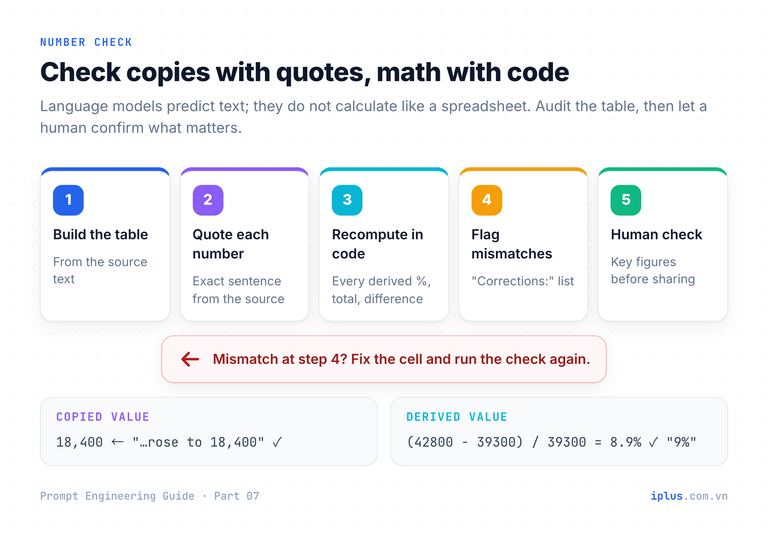
Models copy numbers correctly most of the time, which is why errors slip through: people stop checking. Watch for transcription errors (a dropped digit, swapped rows) and derived errors (a percentage or total calculated wrong). As How LLMs work explains, a model predicts text; it does not compute like a spreadsheet. Run this in the same chat, right after the table:
Check the table you just made against the report.

For every number in the table, output one row:
Cell | Value in table | Exact quote from the report | Match? (yes / no / derived)

- "derived" = calculated, not in the report. Show its formula.
- If you can run code, recompute every derived number with code.
Finish with "Corrections:" and the cells that must change, or "none".| Cell | Value in table | Exact quote from the report | Match? |
|---|---|---|---|
| Ticket volume, Q3 | 18,400 | "Ticket volume rose to 18,400" | yes |
| Cloud spend, Change | 9% over budget | "9% over the $39,300 budget" | yes |
| Median first response, Change | -0.7 h | (none) | derived: 2.4 - 3.1 = -0.7 |
... (trimmed)
Code check: (42800 - 39300) / 39300 = 0.0891, i.e. 8.9%, consistent with "9%".
Corrections: noneSample output: wording varies between runs and models
Warning: A self-check is not proof; the model that made the error is checking it. For a board deck, invoice or contract, verify key numbers yourself or in a spreadsheet.
Study faster: explain terms in context and quiz yourself
Two prompts turn a chatbot into a study partner: one explains a term in the passage where you found it (terms change meaning between fields), the other quizzes you on your own notes.
Explain a term in its context
I'm reading this passage:
"""
{paste the paragraph that contains the term}
"""

Explain what "{term}" means in this passage.
- One plain-language sentence, a concrete example from this domain, and one common confusion with a similar term.
I am {your background, e.g. a support engineer with no payments experience}.
With an API document that says "Retry the request with the same Idempotency-Key header; the server returns the stored result of the first request for 24 hours, so a payment is never charged twice", and the term Idempotency-Key:
Plain meaning: a unique ID attached to a request so the server can recognize repeats of it and process it only once.

Example: your app sends "charge $50" with key 7f3a..., the connection drops, and it retries with the same key. The server does not charge again; it returns the first result.

Common confusion: it is not an authentication key like an API key. It identifies one operation, so use a new key for each new payment.
Sample output: wording varies between runs and models
Quiz yourself from your notes
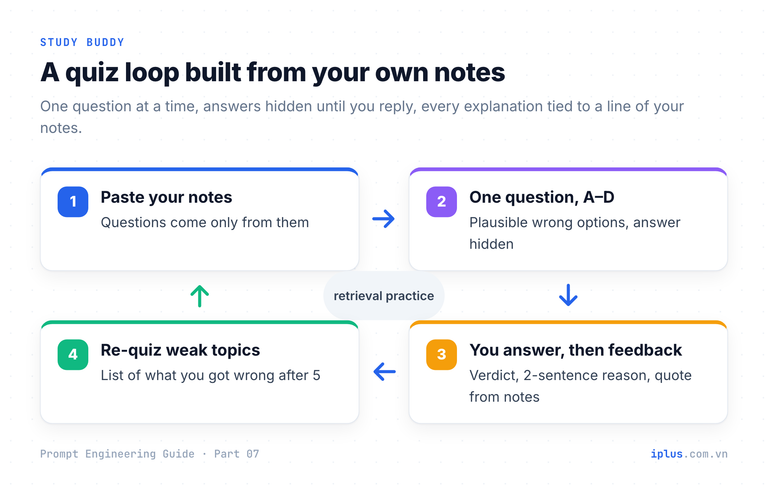
Keep the answers hidden until you have tried: ask for one question at a time. Replace {notes} with your material:
Here are my study notes:
"""
{notes}
"""

Quiz me on these notes, one question at a time.
- Ask a multiple-choice question with options A-D, based only on my notes.
- Make the wrong options plausible: common mistakes, not jokes.
- Wait for my answer. Then tell me whether I'm right, explain in 2 sentences, and quote the line of my notes that answers it.
- After 5 questions, list the topics I got wrong so I can review them.
Start with question 1.Question 1 of 5
According to your notes, what is the main goal of incident management?
A) Find the root cause of every incident
B) Restore normal service as quickly as possible
C) Prevent all future incidents
D) Record every user request in the ticket system
Reply with A, B, C or D.Sample output: wording varies between runs and models
Multiple-choice questions: get answers you can trust
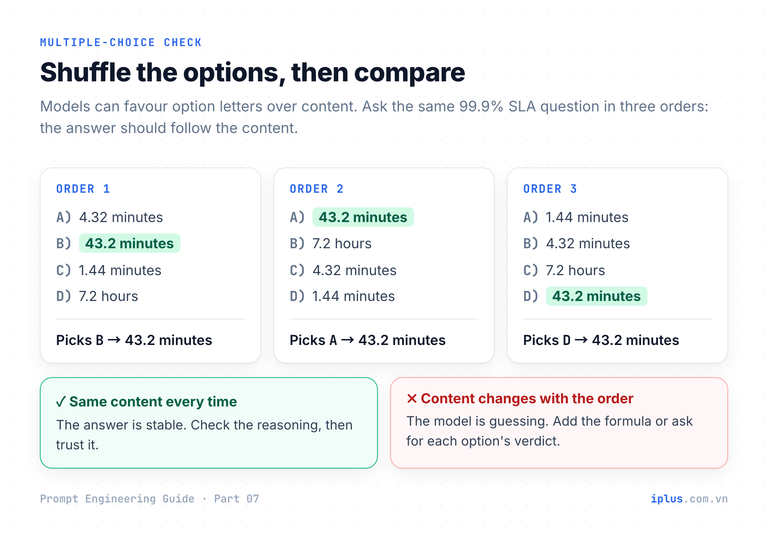
Models are less reliable on multiple choice than they look. Zheng et al. (2023) tested 20 LLMs and found a "selection bias": models prefer certain option letters, such as A, regardless of content. Pezeshkpour and Hruschka (2023) measured accuracy gaps of roughly 13% to 75% just from reordering the options. Four habits help:
- Reason before answering. Reasoning models do this internally; for standard chat models, asking for step-by-step work still helps (Kojima et al., 2022).
- Evaluate every option. A verdict per option exposes reasoning errors.
- Shuffle and ask again. If the chosen content changes with the order, the model is guessing.
- Supply the formula and move arithmetic out of the model's head. Give the rule, ask for the expression first, or let the model run code; the PAL paper (Gao et al., 2022) showed that letting an interpreter compute beats math in plain text.
Answer this multiple-choice question.

Question: A service has a 99.9% monthly uptime SLA. In a 30-day month, what is the maximum downtime allowed?
A) 4.32 minutes
B) 43.2 minutes
C) 1.44 minutes
D) 7.2 hours

Useful rule: allowed downtime = total minutes in the period x (1 - SLA).

1. Work out the answer step by step. Write the expression before computing it.
2. Then evaluate each option on its own line: correct or incorrect, and why.
3. Final line: "Answer: <letter>"1. Minutes in 30 days: 30 x 24 x 60 = 43,200.
Allowed downtime: 43,200 x (1 - 0.999) = 43,200 x 0.001 = 43.2 minutes.
2. A) 4.32 minutes: incorrect (the 99.99% allowance).
B) 43.2 minutes: correct.
C) 1.44 minutes: incorrect (one day, not 30).
D) 7.2 hours: incorrect (the 99% allowance).
Answer: BSample output: wording varies between runs and models
Then paste the question into a new chat with the options reordered. The answer should follow the content, not the letter.
Document analysis for contracts and policies
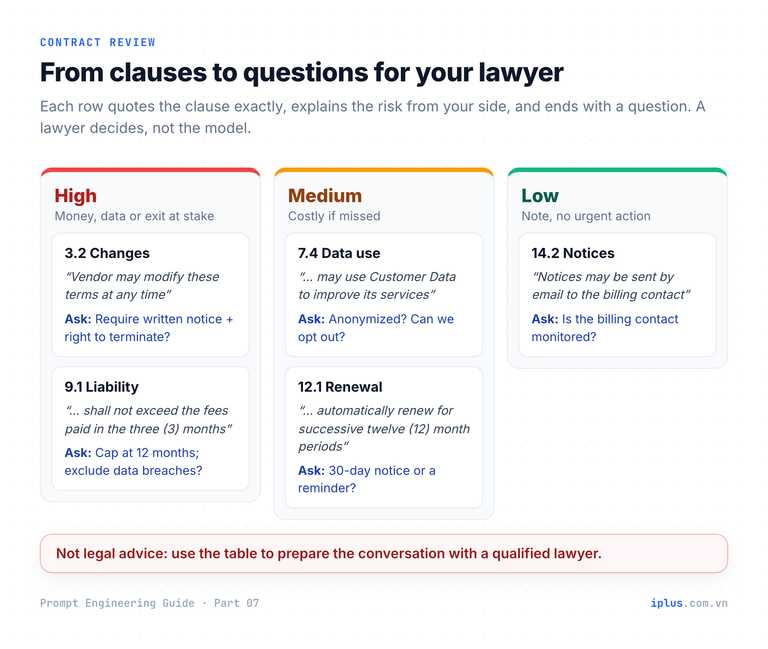
Warning: This is not legal advice. A model can misread a clause or invent law. In Mata v. Avianca (S.D.N.Y., June 2023), lawyers were fined $5,000 for a brief citing court decisions ChatGPT had invented. Use AI to prepare questions; let a lawyer answer them.
Three tasks, in increasing order of risk: understand a clause, flag risky clauses, draft for a lawyer to review.
Explain a clause in plain language
Explain this contract clause in plain language for {your role, e.g. an IT manager who signs vendor contracts}.

Clause:
"""
{paste the clause}
"""

Answer in three parts:
1. What it says, in 2 sentences without legal terms.
2. Who must do what, and by when.
3. A realistic scenario showing how it could affect us.
Do not give an opinion on whether the clause is enforceable.
With a typical SaaS renewal clause (automatic 12-month renewal unless written notice is given at least 90 days before the term ends):
1. The contract renews itself for 12 more months at the end of each term unless either side sends written notice at least 90 days before the end.

2. Either party must send written notice of non-renewal 90+ days before the end date; otherwise a new 12-month term starts.

3. Scenario: your term ends 31 December and you decide in mid-October to switch vendors. The deadline was 2 October, so you owe another full year.
Sample output: wording varies between runs and models
Flag clauses that deserve a second look
You are helping me prepare questions for our lawyer. You are not giving legal advice.

<contract>
{paste the contract}
</contract>

We are the {customer / vendor / employee}. Make a table from our side:
Clause | Exact quote (max 25 words) | Why it may be risky for us | Severity (High / Medium / Low) | Question to ask
- Only clauses that exist in the text, quoted exactly.
- High = could cost significant money, data, or our ability to exit.
Then list standard protections that seem to be missing.| Clause | Exact quote | Why it may be risky for us | Severity | Question to ask |
|---|---|---|---|---|
| 3.2 Changes | "Vendor may modify these terms at any time by posting the updated terms on its website" | Terms can change without our consent or notice | High | Can changes require written notice and give us the right to terminate? |
| 9.1 Liability | "liability shall not exceed the fees paid in the three (3) months preceding the claim" | A data breach could cost far more than 3 months of fees | High | Can the cap be 12 months of fees, with data breaches outside the cap? |
| 12.1 Renewal | "automatically renew for successive twelve (12) month periods" | The 90-day notice window is easy to miss | Medium | Can notice be 30 days, or can the vendor send a reminder? |
Possibly missing: data return or deletion after termination; uptime commitment.Sample output: wording varies between runs and models
Draft from a term sheet, then hand it to a lawyer
For common documents such as an NDA, a model drafts well from agreed terms. Make it flag every assumption so the lawyer's review goes straight to what matters:
Draft a mutual non-disclosure agreement from these agreed terms:
- Parties: {company A} and {company B}
- Purpose: {e.g. evaluating a software development partnership}
- Term: {e.g. 2 years}; confidentiality obligations survive {e.g. 3 years} after it ends
- Governing law: {jurisdiction}
- {any other agreed points}

Use plain English and numbered clauses. Mark every assumption not in my list as [TO CONFIRM: reason] and list them all at the end.
A qualified lawyer will review this draft before use.MUTUAL NON-DISCLOSURE AGREEMENT
1. Purpose. ... (trimmed)
Items to confirm:
1. Whether oral disclosures must be confirmed in writing.
2. Whether contractors, not only employees, may receive information.
3. The court or arbitration venue for disputes.Sample output: wording varies between runs and models
Common mistakes and a safety checklist
Most failures come from a few habits, each with a simple fix:
Mistake | What goes wrong | Fix |
|---|---|---|
"Summarize this" with no reader | Generic summary; the wrong details survive | Set audience, length, format and focus |
Letting the model fill gaps | Invented owners, dates and numbers | Say: "if not stated, write unassigned / n/a" |
Trusting calculated numbers | Wrong percentages and totals | Audit against quotes; recompute in code or a spreadsheet |
Treating a contract review as legal advice | Missed or misread obligations | Use it to prepare questions; a lawyer decides |
Pasting confidential files into personal accounts | Data handled in ways your company has not approved | Use approved business tools; redact identifiers |
On privacy, check where the text goes. OpenAI, for example, states it does not train on ChatGPT Business, Enterprise or API data by default; individual accounts must opt out in Data controls. When in doubt, use placeholders such as [CLIENT_A]. Before forwarding any AI summary, run a final check:
Before I share your summary, check it against the document:
1. List every statement in the summary that the document does not directly support, and explain why.
2. List any important point in the document that the summary leaves out.
3. If anything must change, give me a corrected summary. Otherwise reply "No changes".1. Unsupported statements: none.
2. Points left out: first response improved from 3.1 to 2.4 hours; CSAT held at 91% (outside the requested focus).
3. No changesSample output: wording varies between runs and models
FAQ
How long a document can I paste into ChatGPT or Claude?
Current models accept hundreds of thousands of tokens, enough for a long report or contract; limits vary by model and plan. Put the document first and ask for section-by-section coverage with quotes. For a whole document library, use retrieval: see Build a knowledge-base chatbot (RAG).
Is it safe to upload a contract to an AI chatbot?
It depends on the account and your company's rules. Business and API plans from major vendors generally exclude your data from training by default; personal accounts may not. Use approved tools and remove details the task does not need.
Why does AI get numbers wrong in tables?
A model generates text token by token; it does not calculate. Copied values are usually right; percentages, totals and differences are where errors appear. Ask for formulas and recompute in code or a spreadsheet.
Sources and further reading
- Learn Prompting: Text Summarization
- Learn Prompting: Table Generation
- Learn Prompting: Multiple Choice Questions
- Learn Prompting: Study Buddy
- Learn Prompting: Legal Documents
- Anthropic: Prompting best practices (long context prompting)
- Liu et al. (2023), Lost in the Middle: How Language Models Use Long Contexts
- Zheng et al. (2023), Large Language Models Are Not Robust Multiple Choice Selectors
- Pezeshkpour & Hruschka (2023), LLMs Sensitivity to the Order of Options in Multiple-Choice Questions
- Kojima et al. (2022), Large Language Models are Zero-Shot Reasoners
- Gao et al. (2022), PAL: Program-aided Language Models
- Mata v. Avianca, Inc., Opinion and Order on Sanctions (S.D.N.Y. 2023)
- OpenAI: How your data is used to improve model performance
Prompt Engineering Guide: all parts
← Previous: Part 6: Combining techniques, priming and iteration · Next: Part 8: Prompts for emails, blog posts and marketing →
Read Parts 1–6 in order: each builds on the one before. Parts 7–10 apply them and can be read in any order once you have the basics.
- Part 1: What prompt engineering is, and why it matters
- Part 2: How LLMs work: generative AI basics
- Part 3: Prompt structure: the five parts of a prompt
- Part 4: Instruction and role prompting
- Part 5: Zero-shot, one-shot and few-shot prompting
- Part 6: Combining techniques, priming and iteration
- Part 7: Prompts for summaries, tables and document analysis (you are here)
- Part 8: Prompts for emails, blog posts and marketing
- Part 9: Prompts for coding assistants
- Part 10: Build a knowledge-base chatbot (RAG)
Need help with this?
Explore the iPlus Solution services most relevant to this article.