Prompt Engineering Guide · Part 5 of 10. This part builds on Part 4: Instruction and role prompting. New to the series? Start with Part 1: What prompt engineering is, and why it matters.
Sometimes an instruction is not enough. You ask a model to tag support tickets by priority and it labels a minor glitch as "normal" when your team would call it "low". You ask for JSON and get JSON with different keys every time. Few-shot prompting fixes this class of problem: instead of describing what you want, you show the model a few finished examples and let it copy the pattern.
This guide covers zero-shot, one-shot and few-shot prompting with one running example, then applies the technique to the three jobs where it pays off most: controlling output format, extracting fields from messy text, and classifying with your own rules. Each section has a prompt you can paste into ChatGPT, Claude or Gemini, and the result to expect.
What zero-shot, one-shot and few-shot prompting mean
Large language models can pick up a task from examples placed in the prompt itself, with no retraining. This is called in-context learning. It was the headline finding of the GPT-3 paper, "Language Models are Few-Shot Learners" (Brown et al., 2020). One example is called a "shot", so the names simply count the examples:
Technique | Examples in the prompt | Best for |
|---|---|---|
Zero-shot | 0, instruction only | Common tasks with obvious labels |
One-shot | 1 | Showing an output format |
Few-shot | 2 or more, usually 2–5 | Your own labels, strict formats, edge cases |
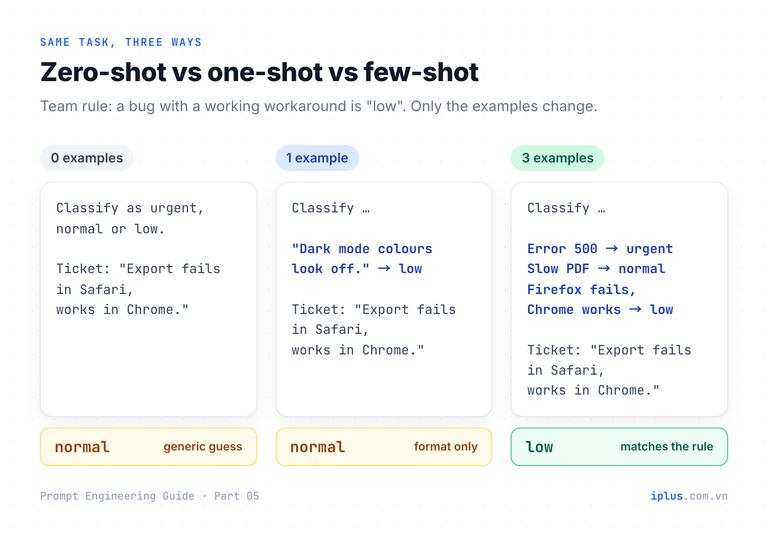
To see the difference, we will classify the same support ticket three times. The ticket describes a real bug, but a workaround exists. In our imaginary team policy, a bug with a working workaround is low priority.
Zero-shot: instruction only
Classify the priority of this support ticket as urgent, normal or low.
Reply with the label only.

Ticket: "The export button does nothing in Safari. Exporting from Chrome works."normalSample output: wording varies between runs and models
The answer is reasonable, just not your policy. The model has never seen your team's rules, so it falls back on a generic idea of priority.
One-shot: one example
Classify the priority of each support ticket as urgent, normal or low.
Reply with the label only.

Ticket: "Dark mode colours look slightly off on the settings page."
Priority: low

Ticket: "The export button does nothing in Safari. Exporting from Chrome works."
Priority:normalSample output: wording varies between runs and models
One example fixed the format (a bare label after Priority:) but taught only that cosmetic issues are low. A broken button is not cosmetic, so the answer stays the same.
Few-shot: one example per label
Classify the priority of each support ticket as urgent, normal or low.
Reply with the label only.

<examples>
Ticket: "Nobody can log in. The login page returns error 500."
Priority: urgent

Ticket: "PDF reports take about two minutes to generate instead of ten seconds."
Priority: normal

Ticket: "Bulk delete fails in Firefox. It works in Chrome, so we use that for now."
Priority: low
</examples>

Ticket: "The export button does nothing in Safari. Exporting from Chrome works."
Priority:lowSample output: wording varies between runs and models
The third example carries the rule nobody wrote down: broken in one browser, works in another, so low. The model matched the new ticket to that pattern.
Tip: in a chat window, paste the whole block as one message. The last line Priority: acts as an answer cue, telling the model exactly where its reply starts.When to use zero-shot vs few-shot prompting
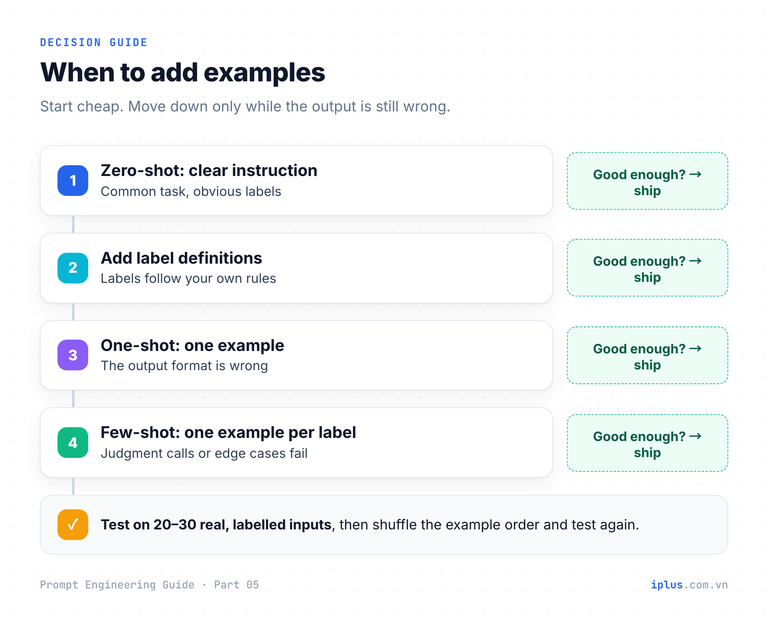
Examples cost tokens on every call and take effort to maintain, so they are not the first fix to reach for. Modern models follow instructions well, and OpenAI's reasoning best practices explicitly recommend trying zero-shot first with reasoning models and adding examples only if the output needs it. A clear definition of each label often closes most of the gap:
Classify the priority of this support ticket.

Definitions:
- urgent: many users blocked, data loss, security or billing errors, no workaround
- normal: a feature is broken or slow for some users, no easy workaround
- low: cosmetic issues, or a bug with a working workaround

Reply with the label only.

Ticket: "{ticket_text}"
Replace {ticket_text} with the ticket. For the Safari ticket above:
lowSample output: wording varies between runs and models
Move to few-shot when definitions stop helping: the labels depend on judgment that is hard to put into words, the output format is strict, or the same edge cases keep coming out wrong. In practice the strongest prompts combine both: definitions say what each label means, examples show where the boundaries are.
Control the output format with few-shot examples
This is the most useful thing examples do. A model reproduces the shape of your examples more consistently than it follows a written description of that shape. Change the examples and the same input comes back as a single word, a sentence or a JSON object. Here is the JSON version, ready to use:
Turn each app review into JSON. Follow the examples exactly.

Review: "Sync is fast and the new widgets are great."
JSON: {"sentiment": "positive", "topics": ["sync", "widgets"], "needs_reply": false}

Review: "Lost all my notes after the update. Restoring from backup didn't work."
JSON: {"sentiment": "negative", "topics": ["data loss", "backup"], "needs_reply": true}

Review: "Nice clean design, but search is slow on large notebooks."
JSON: {"sentiment": "mixed", "topics": ["design", "search speed"], "needs_reply": false}

Review: "{review_text}"
JSON:
Replace {review_text} with a real review. With "Love the design, but the app drains my battery in two hours." you get:
{"sentiment": "mixed", "topics": ["design", "battery life"], "needs_reply": true}Sample output: wording varies between runs and models
Notice the mixed example. Without it, the model would have to squeeze this review into positive or negative, or invent a label of its own. Examples define the allowed answers as much as the format.
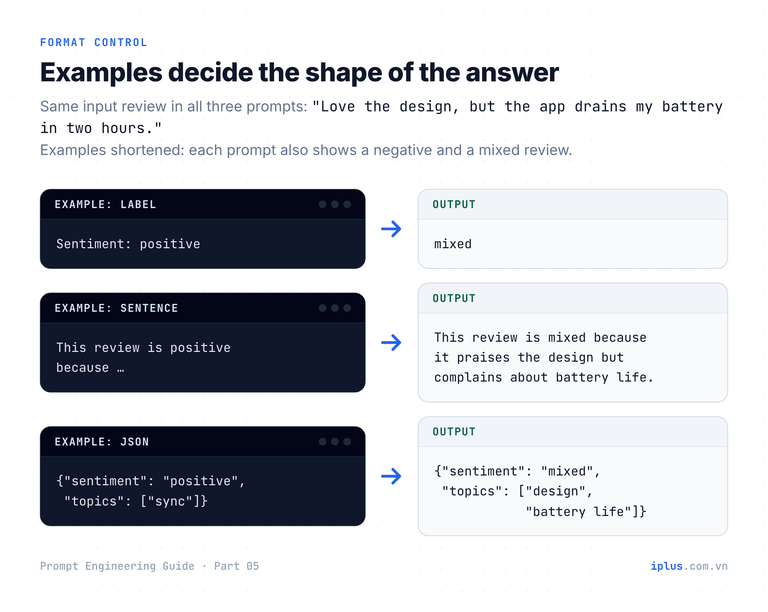
Example pattern | What the model returns |
|---|---|
| One word per review |
| One sentence with a reason |
| A JSON object with the same keys |
Extract fields from messy text with few-shot prompting
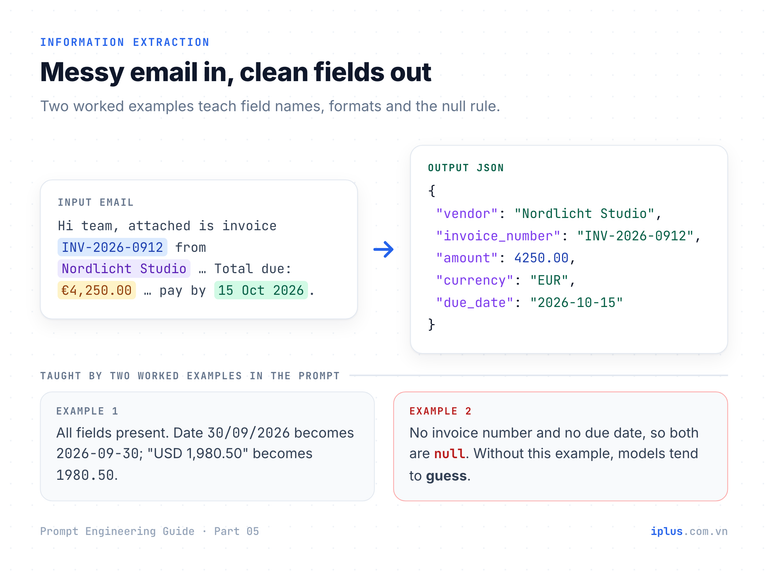
Extraction is where few-shot prompting saves the most manual work: vendor emails, CVs, order notes or contracts become rows you can paste into a spreadsheet or parse in code. The examples teach four things at once: the field names, the date format, the number format, and what to write when a value is missing.
Extract invoice details from each email. Use ISO dates (YYYY-MM-DD),
numbers without currency symbols, and null for anything not stated.

Email: "Hello, invoice #A-7731 for the August cloud hosting is attached.
Amount due: USD 1,980.50, payable by 30/09/2026. Regards, Harbor Cloud"
Output: {"vendor": "Harbor Cloud", "invoice_number": "A-7731", "amount": 1980.50, "currency": "USD", "due_date": "2026-09-30"}

Email: "Hi, here's our bill for the July photo shoot: 12,000,000 VND.
Thanks! Linh Studio"
Output: {"vendor": "Linh Studio", "invoice_number": null, "amount": 12000000, "currency": "VND", "due_date": null}

Email: "{email_text}"
Output:
Paste the email in place of {email_text}. For example:
Email: "Hi team, attached is invoice INV-2026-0912 from Nordlicht Studio for the
September design retainer. Total due: €4,250.00 (VAT included). Please pay by
15 Oct 2026. Thanks, Mara"

Output: {"vendor": "Nordlicht Studio", "invoice_number": "INV-2026-0912", "amount": 4250.00, "currency": "EUR", "due_date": "2026-10-15"}
Sample output: wording varies between runs and models
The second example is the important one. It shows a missing invoice number and a missing due date returned as null instead of a guess. Without an example like that, models tend to fill gaps with plausible values, which is the worst outcome in finance data. For longer documents and tables, see Prompts for summaries, tables and document analysis.
Warning: always spot-check extracted numbers against the source. A model can copy a digit wrong, and nothing in the output will tell you.
A reusable few-shot prompt template
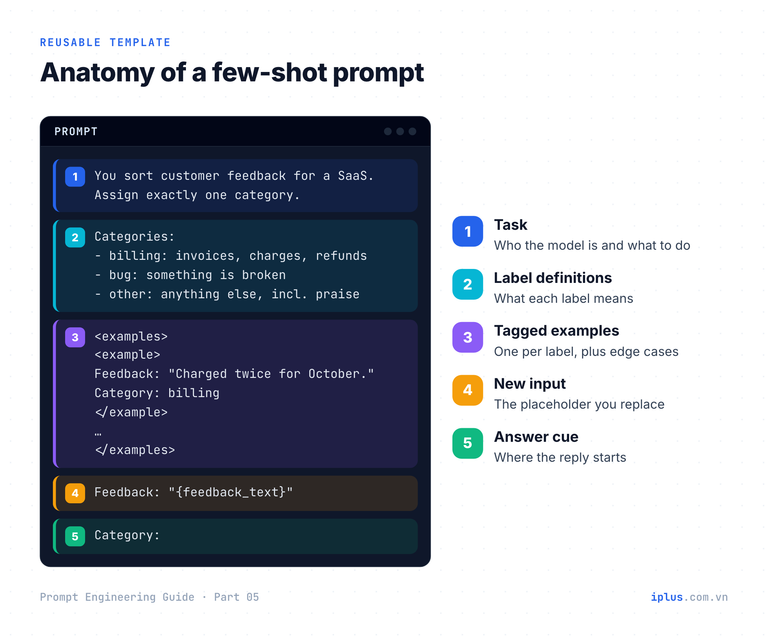
Once a prompt works, you will reuse it, edit it and hand it to colleagues. A fixed layout keeps it readable. Wrapping the examples in tags also helps the model tell examples apart from instructions, which Anthropic's prompting guide recommends for the same reason. This template classifies customer feedback and includes an edge case the model would otherwise get wrong:
You sort customer feedback for a project-management SaaS.
Assign exactly one category.

Categories:
- billing: invoices, charges, refunds, plan changes
- bug: something that used to work or should work is broken
- feature_request: asks for something the product does not do
- account: login, password, user seats, permissions
- other: anything else, including praise with no request

<examples>
<example>
Feedback: "We were charged twice for October."
Category: billing
</example>
<example>
Feedback: "Please add a Gantt view for sub-tasks."
Category: feature_request
</example>
<example>
Feedback: "Since yesterday, drag-and-drop between boards doesn't work."
Category: bug
</example>
<example>
Feedback: "Your support team was fantastic this week, thank you!"
Category: other
</example>
</examples>

Feedback: "{feedback_text}"
Category:
Replace {feedback_text}. With "I can't add a fifth teammate, it says we hit the seat limit." the model returns:
accountSample output: wording varies between runs and models
Seat limits sit on the line between billing and account. The category definitions settle it, and the praise example stops the model from forcing compliments into a product category.
Few-shot prompting best practices backed by research
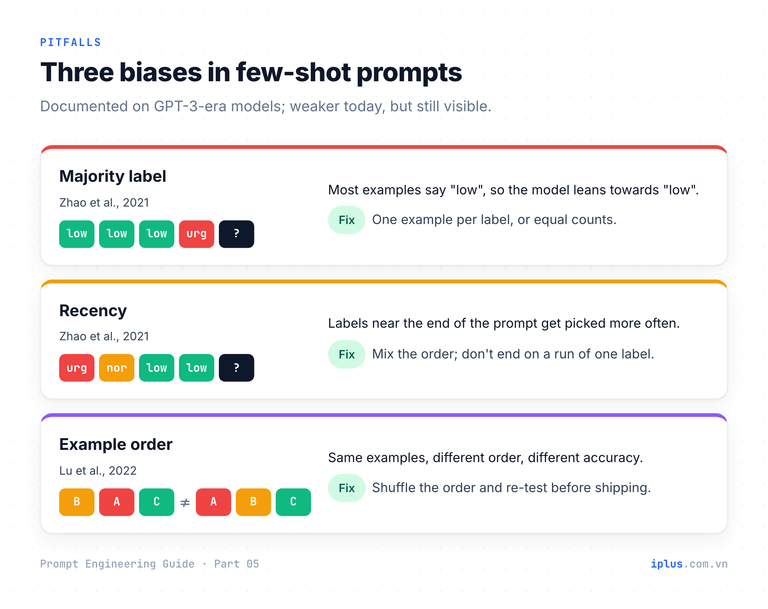
Few-shot prompting was studied heavily on GPT-3-era models, and the findings still explain most of the failures you will see. Three results matter most in practice:
- Format and label space matter more than you expect. Min et al. (2022) found that randomly replacing the labels in demonstrations barely hurt performance on classification and multiple-choice tasks across 12 models. What drove results was that the examples showed the possible labels, the kind of input text and the overall format. A later study, Wei et al. (2023), showed that larger models do follow the labels in the examples, even flipped ones. The practical rule: get the format and label set right, and make the labels correct too, because modern models do learn from them.
- Models lean towards some answers. Zhao et al. (2021) showed few-shot accuracy could swing from near chance to near state of the art depending on format, example choice and order, because models favour labels that appear often or near the end of the prompt.
- Order changes results. Lu et al. (2022) found that the same examples in different orders could make the difference between near state-of-the-art and random-guess performance, and a good order for one model did not carry over to another.
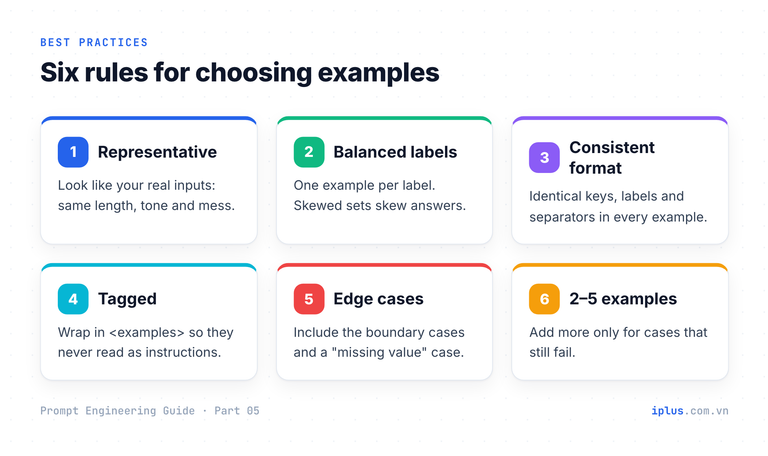
Current models are far less fragile than GPT-3, but the direction of these effects still shows up in production prompts. Six habits counter them:
Choosing examples is the hard part, and the model can help you find gaps. Paste your examples into this prompt:
Here are the few-shot examples I use to classify support tickets:

{your_examples}

List 5 realistic tickets these examples do not cover well:
cases near the boundary between two labels, or unusual wording.
For each, give the label you think fits and one line on why it is tricky.1. "Our invoices show last month's logo." Likely low: a billing document,
but cosmetic. The word "invoice" may pull it towards urgent.
2. "Two of our 40 users can't log in." Likely normal: login is blocked,
but only for a few users. Your urgent example says "nobody".
3. "Export works but the CSV has the wrong date format." Likely normal:
output is wrong, no failure message, workaround unclear.
(trimmed)Sample output: wording varies between runs and models
Add the two or three most realistic ones to your examples with the label your team actually wants. That is how a few-shot prompt gets better over time.
Limitations, and when to use structured outputs instead
Few-shot prompting has costs worth knowing before you rely on it in production:
- Copying content, not just form. If every example mentions "invoices", the model may see invoices where there are none. Vary topics, length and wording across examples.
- Surface patterns. If every urgent example contains the word "error", the model may learn "error = urgent". Include an urgent example without it.
- Token cost. Examples are sent with every request. Ten long examples on a high-volume classifier add up. Keep them short and drop any that do not change results.
- No guarantee of valid JSON. Examples make the format very likely, not certain.
For that last point, use the structured-output feature of your API when code will parse the result. OpenAI's Structured Outputs feature, for example, makes responses adhere to a JSON Schema you supply. The schema for the invoice extractor above looks like this:
{
  "type": "object",
  "properties": {
    "vendor": { "type": "string" },
    "invoice_number": { "type": ["string", "null"] },
    "amount": { "type": "number" },
    "currency": { "type": "string", "description": "ISO 4217 code, e.g. USD" },
    "due_date": { "type": ["string", "null"], "description": "YYYY-MM-DD" }
  },
  "required": ["vendor", "invoice_number", "amount", "currency", "due_date"],
  "additionalProperties": false
}
The schema guarantees the shape; examples still teach judgment, such as how to read "30/09/2026" or when to return null. Use both together. For how examples fit with roles, instructions and context in one prompt, see Combining techniques, priming and iteration and Prompt structure: the five parts of a prompt.
Common mistakes and a checklist
Mistake | What happens | Fix |
|---|---|---|
All examples share one label | Model over-predicts that label | One example per label, or balanced counts |
Examples all look alike | Model copies their topic or wording | Vary topic, length and phrasing |
Missing values never shown | Model invents plausible values | Add an example that returns null |
Format differs between examples | Output format drifts | Identical labels, keys and separators |
Examples contradict the instruction | Unpredictable results | Make instruction and examples agree |
Hardest cases left out | Edge cases fail in production | Add real boundary cases from your data |
Before shipping a few-shot prompt, run it on 20 to 30 real inputs you have already labelled, then shuffle the example order and run it again. If the results change noticeably, your examples need work.
FAQ
How many examples should a few-shot prompt have?
Usually two to five. Start with one example per label or per format variation, then add examples only for cases that still fail. More examples cost tokens on every call and rarely help once the pattern is clear.
Is few-shot prompting better than zero-shot?
Not automatically. For common tasks with obvious labels, a clear zero-shot instruction is cheaper and often just as good. Few-shot wins when your labels follow your own rules, when the format must be exact, or when specific edge cases keep failing.
Do reasoning models still need few-shot examples?
Less often. OpenAI advises trying zero-shot first with its reasoning models and adding examples only for complex output requirements. Anthropic notes that worked examples still shape how Claude approaches similar problems when it thinks. Examples remain the most reliable way to pin down a format.
What is the difference between few-shot prompting and fine-tuning?
Few-shot prompting puts examples in the prompt for each request and changes nothing in the model. Fine-tuning trains the model on many examples so the behaviour is built in. Try few-shot first: it is instant, free to change and good enough for most business tasks.
Sources and further reading
- Learn Prompting: Shot-Based Prompting (zero-shot, one-shot, few-shot)
- Brown et al. (2020), Language Models are Few-Shot Learners
- Min et al. (2022), Rethinking the Role of Demonstrations
- Zhao et al. (2021), Calibrate Before Use
- Lu et al. (2022), Fantastically Ordered Prompts and Where to Find Them
- Wei et al. (2023), Larger language models do in-context learning differently
- Anthropic: Prompting best practices (examples and XML tags)
- OpenAI: Reasoning best practices
- OpenAI: Structured Outputs
Prompt Engineering Guide: all parts
← Previous: Part 4: Instruction and role prompting · Next: Part 6: Combining techniques, priming and iteration →
Read Parts 1–6 in order: each builds on the one before. Parts 7–10 apply them and can be read in any order once you have the basics.
- Part 1: What prompt engineering is, and why it matters
- Part 2: How LLMs work: generative AI basics
- Part 3: Prompt structure: the five parts of a prompt
- Part 4: Instruction and role prompting
- Part 5: Zero-shot, one-shot and few-shot prompting (you are here)
- Part 6: Combining techniques, priming and iteration
- Part 7: Prompts for summaries, tables and document analysis
- Part 8: Prompts for emails, blog posts and marketing
- Part 9: Prompts for coding assistants
- Part 10: Build a knowledge-base chatbot (RAG)
Need help with this?
Explore the iPlus Solution services most relevant to this article.