Prompt Engineering Guide · Part 8 of 10. An applications part: it assumes the basics from Parts 1–6. New to the series? Start with Part 1: What prompt engineering is, and why it matters.
Most people try AI writing prompts by typing a topic, get something generic back, and decide the tool cannot write for their business. The model is rarely the problem: a one-line request leaves audience, length, facts and tone open, and the model fills each gap with an average guess.
Below are copy-ready prompts for short posts, emails, blog articles and marketing copy. Replace the parts in {curly braces} and run them in ChatGPT, Claude or Gemini. All examples use Ledgerly, a fictional invoicing tool whose new release adds automatic bank reconciliation.
Short-form content: give the model a format, not just a topic
Use the structure from the five parts of a prompt: who reads it, what it must achieve, which facts it may use, and what shape it takes. Listing the facts matters most: a model without facts invents plausible ones.
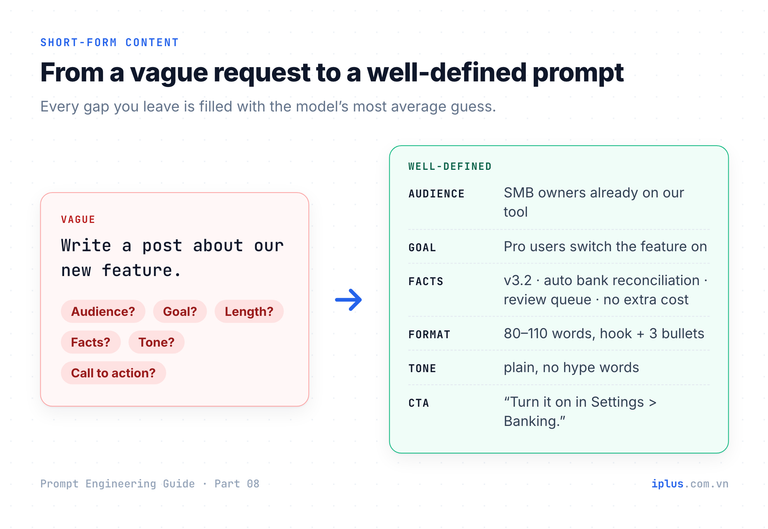
Instead of "Write a post about our new feature.", spell everything out:
Write a LinkedIn post announcing a product update.

Audience: owners and accountants at small businesses who already use our invoicing software.
Goal: get existing Pro customers to switch the new feature on.
Facts (use only these):
- Product: Ledgerly, cloud invoicing
- New in v3.2: automatic bank reconciliation
- It matches incoming bank transfers to open invoices and marks them paid
- Payments that do not match go to a review queue
- Included in the Pro plan at no extra cost
Format: 80-110 words; first line a hook under 12 words, no emoji; 3 short bullets; last line "Turn it on in Settings > Banking."
Tone: plain and confident. No hype words such as "revolutionary" or "game-changer".Your invoices can now mark themselves as paid.
Ledgerly v3.2 adds automatic bank reconciliation, and if you're on Pro, it's already in your plan at no extra cost.
• Incoming bank transfers are matched to open invoices and marked paid, so you no longer tick them off one by one.
• Payments that don't match land in a review queue, so you only check the exceptions.
• Your invoice list shows what's actually been paid, without a separate spreadsheet.
Less time at month-end, fewer "has this been paid?" emails.
Turn it on in Settings > Banking.Sample output: wording varies between runs and models
Let the model write the prompt for you
When you only have a rough idea, have the model interview you first. Your answers become the full prompt.
I will give you a rough writing request. Do not write the piece yet.
1. List what is missing: audience, goal, channel, length, facts, tone, call to action.
2. Ask me up to 5 short questions to fill those gaps.
3. After I answer, write the complete prompt in a code block, one labelled line per item.

Rough request: {your one-line request}
Write longer pieces one paragraph at a time
You approve each paragraph before the next is written, so a wrong turn costs one paragraph, not a draft.
I am writing a {length}-word {type of piece} for {audience} about {topic}.
Outline: {outline}
Approved so far:
"""
{paste approved paragraphs}
"""
Write only the next paragraph, covering: {next point}. Same tone and sentence length, no repeated points. Stop after one paragraph.
Emoji suggestions: per sentence, with a budget
Ask sentence by sentence and cap the total; you make the final pick.
Suggest emojis for the post below, sentence by sentence: 3 options each with a 3-word reason, then your top pick or "skip".
Rules: at most 2 emojis in the whole post, none in the first line. Audience: {who reads it}; avoid playful or ambiguous emojis.

Post:
{paste your post}1. "Your invoices can now mark themselves as paid." → first line, no emoji.
2. "Incoming bank transfers are matched..." → ✅ marked as paid / 🔄 automatic matching / 🏦 bank transfers. Pick: ✅
3. "Payments that don't match land in a review queue..." → 🔍 review exceptions / 📋 queue list / ⚠️ needs attention. Pick: 🔍
4. "Your invoice list shows..." → skip (budget used)Sample output: wording varies between runs and models
Tip: on X, each emoji and each Japanese character counts as 2 toward the 280 limit (X developer docs).
Control tone and voice in AI writing
Name the register and the reader, not adjectives like "engaging". Asking for several registers side by side keeps the facts identical and lets you pick.
Rewrite the message below in three registers. Return a table: Register | Message | When to use it.
Registers: formal (new enterprise client), friendly (long-term customer), brief (Slack to a colleague).
Keep every fact unchanged. Each version under 60 words.

Message: "{your message}"| Register | Message | When to use it |
|---|---|---|
| Formal | Dear [Client Name], the invoice export scheduled for Tuesday will now be ready on Thursday, due to a change in the bank's file format. We apologise for the inconvenience. | New enterprise client |
| Friendly | Hi [Name], quick heads-up: the invoice export will be ready Thursday instead of Tuesday. The bank changed its file format. Thanks for your patience! | Long-term customer |
| Brief | Invoice export moves Tue → Thu. Bank changed its file format. | Slack |Sample output: wording varies between runs and models
Match your own voice with 3–5 samples
This is few-shot prompting applied to style. Ask for a style profile before the draft: you can correct it ("I never use exclamation marks") before it shapes the text.
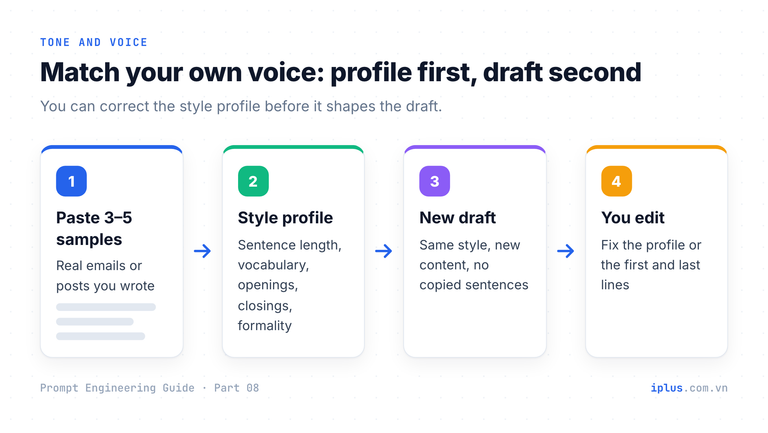
You will write in my voice. Below are 4 emails I wrote.

<samples>
<sample>{email 1}</sample>
<sample>{email 2}</sample>
<sample>{email 3}</sample>
<sample>{email 4}</sample>
</samples>

Step 1: Describe my style in 5 bullets: sentence length, vocabulary, openings and closings, use of lists, formality.
Step 2: In that style, write a new email that says: {what it must say}.
Do not copy sentences from the samples or add facts not in my request.Step 1: Your style
- Short sentences, one idea each; exact numbers and dates.
- Opens with the first name, straight to the point; closes "Thanks," + first name.
- Numbered list whenever there are two or more requests.
(trimmed)
Step 2: New email
Hi Ana,
The reconciliation feature is live on your account. Two things before Friday:
1. Connect your main bank account in Settings > Banking.
2. Check the review queue once.
Thanks,
MinhSample output: wording varies between runs and models
Warning: describe a style ("short sentences, dry humour") instead of impersonating a real, living person. Imitating a named person misleads readers, adds legal and brand risk, and does nothing for accuracy.
Email prompts: write, adjust, triage and reply
A complete email from labelled facts
Give five things: who writes, who reads, the purpose, the facts, and the one action you want. Labels keep facts apart from instructions; a word limit stops padding.
Write an email with a subject line.
From: {your name and role}
To: {recipient, role, relationship}
Purpose: {one sentence}
Key facts:
- {fact 1}
- {fact 2}
Ask: {what you need, by when}
Tone: {e.g. polite and direct}
Length: under {N} words.
Filled in to confirm a go-live on Monday 2 November and request a bank-statement CSV by Thursday:
Subject: Go-live on Monday 2 November: one file needed by Thursday

Hi Ana,
We're on track to go live with Ledgerly on Monday, 2 November. To test bank reconciliation first, could you send last month's bank statement as a CSV file by Thursday?
Once we have it, we'll run a test match and share the results with you on Friday.

Thanks,
Minh
Sample output: wording varies between runs and models
The Friday promise was not in the facts: the model added it. This is typical, so read every commitment before sending. To adjust a draft, follow up instead of starting over:
Follow-up prompt | Use it when |
|---|---|
"Make it 30% shorter without losing any fact." | The draft is padded |
"Make it firmer, but not angry. Keep the deadline." | A second reminder |
"Remove all jargon for a non-technical reader." | Management or end users |
"Rewrite it as polite business Japanese (keigo)." | Japanese clients |
Triage a long email into actions
Ask for structure before a reply. Telling the model to write "not stated" for missing deadlines stops invented dates. (More in prompts for summaries, tables and document analysis.)
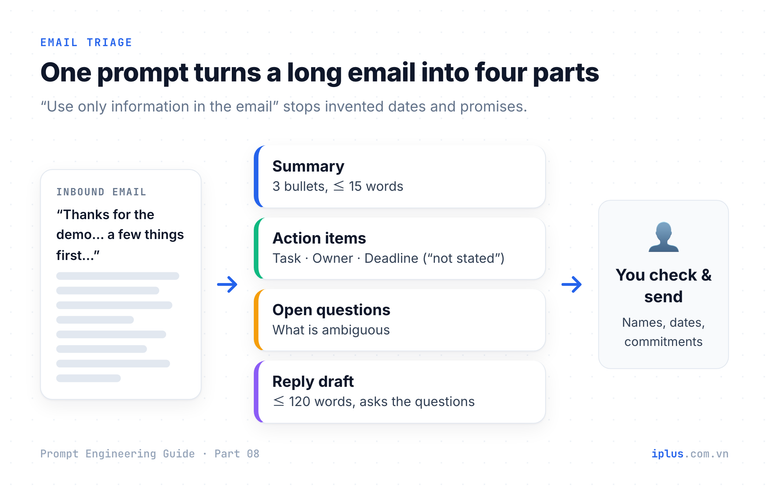
Process the email below in four parts.
1. Summary: 3 bullets, max 15 words each.
2. Action items: table Task | Owner (me / them) | Deadline. Write "not stated" if none is given.
3. Open questions: anything ambiguous.
4. Reply draft: under 120 words; confirm what I will look into and ask the open questions.
Use only information in the email. If something is unclear, say so instead of guessing.

Email:
"""
{paste the email}
"""
For a prospect who wants to move four dental clinics from QuickBooks Desktop:
2. Action items
| Task | Owner | Deadline |
|---|---|---|
| Confirm import of 2 years of invoices incl. partially paid | me | not stated |
| Check bank feed support for Harbor Community CU | me | not stated |
| Schedule front-desk training | me | before the 15th |
| Clarify whether $29 is per user or per clinic | me | not stated |

3. Open questions
- Which month's 15th? The email doesn't say.
- Do all 11 people need full access?
(summary and reply draft trimmed)
Sample output: wording varies between runs and models
Personalised outreach from public information
Paste something the person published and tell the model to reference one specific point, and nothing it cannot see.
Write a short first-contact email.
About me: {who you are, what you offer, one proof point}
About them (text they published):
"""
{paste their public text}
"""
Rules: mention one specific point from their text and why it matters to us; use only facts from the two blocks; no invented compliments or numbers; under 110 words; one ask (a 20-minute call).Hi Kevin,
In your post on the Morgan & Shah blog, you wrote that January is spent chasing clients for bank statements before you can reconcile anything.
I work at Ledgerly, a cloud invoicing tool. Our clients connect their bank once and payments are matched to invoices automatically, so that chasing step largely disappears.
Would a 20-minute call next week be useful?
(trimmed)Sample output: wording varies between runs and models
Warning: use only information people published for professional purposes, never scraped personal data, and follow local privacy and anti-spam rules. Do not paste confidential emails into an AI tool unless your company’s plan and policy allow it.
Blog posts: a five-step workflow with AI writing prompts
One "write a blog post about X" prompt gives a long, shallow article. Fix the structure while it is cheap to change, then draft one section at a time and add your own verified facts, the same loop as in combining techniques and iteration.
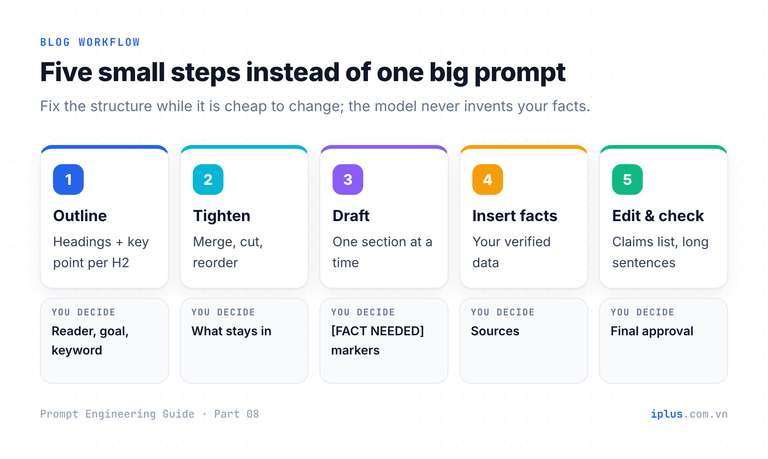
Step 1: Create an outline for a blog post.
Topic: {topic}. Reader: {who, what they know}. Goal: after reading, the reader can {outcome}.
Primary keyword: {keyword}. Length: {N} words.
Return a working title, H2/H3 headings, and under each H2 its key point and the example or data it needs.

Step 2: Cut the outline to 5 H2 sections; merge overlaps and explain each change in one line.

Step 3: Write section {number} only, about {N} words. Where a number, price or claim needs a source, write [FACT NEEDED: what] instead of guessing.

Step 4: Verified facts: {facts with sources}. Replace each [FACT NEEDED] with a matching fact; keep the marker if none fits.
Step 5: edit and fact-check. Ask for a review, not a rewrite:
Review the draft below as an editor. Do not rewrite it.
1. List every factual claim and whether it comes from my facts or from you.
2. Flag sentences over 25 words and any hype words.
3. Suggest a meta description of 140-155 characters.

Draft:
"""
{paste the draft}
"""1. Factual claims
- "Matching runs every hour" → from your facts.
- "Most small businesses spend two days on month-end" → NOT from your facts. Remove it or add a source.
- "Bank-grade encryption" → NOT from your facts. Confirm with your security team.
2. Long sentences: paragraph 2, sentence 1 (31 words). Hype: "effortless".
(trimmed)Sample output: wording varies between runs and models
Tip: Google rewards helpful, original content however it is produced; generating content mainly to manipulate rankings breaks its spam policies (Google Search Central).
Digital marketing prompts: SEO, ads, budgets and replies
Keyword clusters with search intent
Models are good at listing how buyers phrase a need and grouping phrases by intent, but have no live search volumes. Get ideas and structure here; check volumes in Keyword Planner or Search Console.
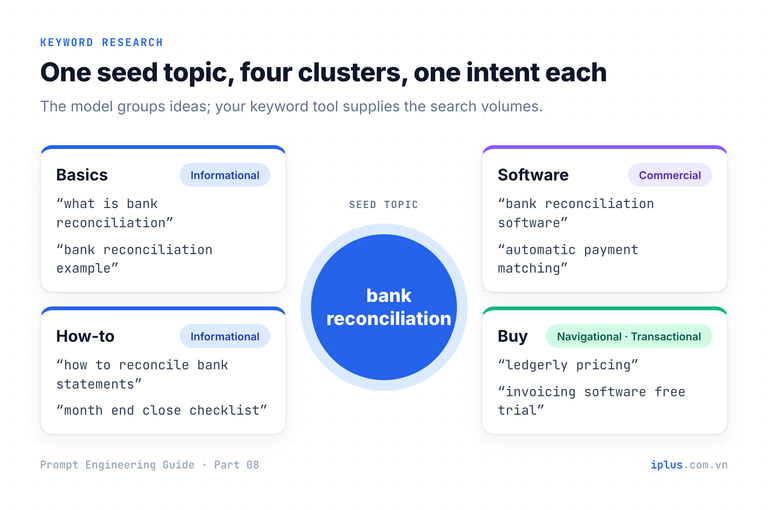
Act as an SEO specialist. Product: {one-line description}. Market: {country and language}. Seed topic: {topic}.
1. Suggest 20 keywords a buyer might search.
2. Group them into 4-6 clusters.
3. Return a table: Cluster | Keyword | Search intent (informational, commercial, transactional, navigational) | Suggested page type.
Do not estimate search volume.| Cluster | Keyword | Search intent | Suggested page type |
|---|---|---|---|
| Basics | what is bank reconciliation | informational | Guide / glossary |
| How-to | how to reconcile bank statements | informational | Step-by-step tutorial |
| Software | bank reconciliation software | commercial | Product page |
| Buy | invoicing software free trial | transactional | Sign-up landing page |
(trimmed to 4 of 20 rows)Sample output: wording varies between runs and models
Title tags and meta descriptions
Google sets no fixed length; titles and snippets are cut to fit the device width (title links, snippets). About 50–60 characters for titles and 140–160 for descriptions usually shows in full.
Write 5 title tag and meta description pairs for: {URL or one-paragraph summary}.
Primary keyword: {keyword}. Title: keyword near the start, 50-60 characters. Meta description: 140-155 characters, one concrete benefit, ends with a call to action.
Return a table: # | Title | Title length | Meta description | Description length| # | Title | Title length | Meta description | Description length |
|---|---|---|---|---|
| 1 | Automatic Bank Reconciliation for Small Business | Ledgerly | 59 | Match incoming bank transfers to open invoices automatically and review only the exceptions. Close your month in hours, not days. Start a free trial. | 149 |
(trimmed to 1 of 5)Sample output: wording varies between runs and models
Responsive search ads within Google’s limits
Responsive search ads take 3–15 headlines of up to 30 characters and 2–4 descriptions of up to 90; full-width characters such as Japanese count as 2 (Google Ads Help). Headlines combine in any order, so each must stand alone.
Write assets for a Google responsive search ad. Product: {product}. Keyword: {keyword}. Offer: {offer}.
- 10 headlines, each 30 characters or fewer, each a different angle.
- 4 descriptions, each 90 characters or fewer.
- Put the character count after each line in brackets, e.g. [27].
- No claims that are not in the offer.Headlines
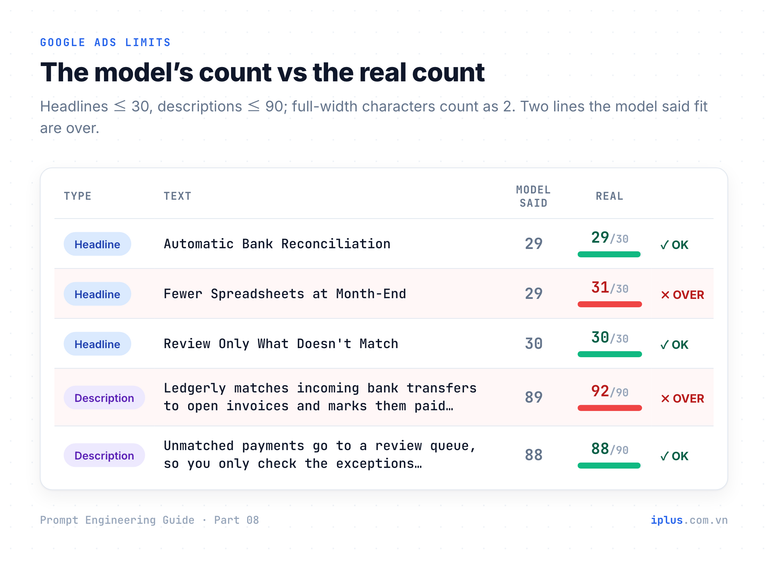
1. Automatic Bank Reconciliation [29]
3. Fewer Spreadsheets at Month-End [29]
4. Review Only What Doesn't Match [30]
Descriptions
1. Ledgerly matches incoming bank transfers to open invoices and marks them paid automatically. [89]
(trimmed)Sample output: wording varies between runs and models
Check every character count yourself
Headline 3 is really 31 characters and description 1 is 92, so Google would reject both. Models read tokens, chunks of characters, not single letters (OpenAI on tokens; see how LLMs work), so their counts are estimates. Check before uploading:
# check_ad_lengths.py: verify ad text against Google Ads limits before you paste it.
# Google counts each full-width (Japanese, Chinese, Korean) character as 2.
import unicodedata

LIMITS = {"H": 30, "D": 90}  # H = headline, D = description

def ad_length(text: str) -> int:
    return sum(2 if unicodedata.east_asian_width(ch) in ("W", "F") else 1 for ch in text)

# One asset per line: "H|text" or "D|text". Paste the model's output here.
ASSETS = """
H|Automatic Bank Reconciliation
H|Fewer Spreadsheets at Month-End
H|Review Only What Doesn't Match
H|入金と請求書を自動でマッチング
D|Ledgerly matches incoming bank transfers to open invoices and marks them paid automatically.
D|Unmatched payments go to a review queue, so you only check the exceptions. Try Pro free.
"""

for line in ASSETS.strip().splitlines():
    kind, text = line.split("|", 1)
    n, limit = ad_length(text), LIMITS[kind]
    status = "OK  " if n <= limit else "OVER"
    print(f"{status} {kind} {n:>3}/{limit}  {text}")
Output of python3 check_ad_lengths.py (no Python? =LEN(A2) in Sheets or Excel works for English text):
OK   H  29/30  Automatic Bank Reconciliation
OVER H  31/30  Fewer Spreadsheets at Month-End
OK   H  30/30  Review Only What Doesn't Match
OK   H  30/30  入金と請求書を自動でマッチング
OVER D  92/90  Ledgerly matches incoming bank transfers to open invoices and marks them paid automatically.
OK   D  88/90  Unmatched payments go to a review queue, so you only check the exceptions. Try Pro free.
Budget allocation with a reasoning column
Force reasoning and assumptions so you can challenge the split: it is a hypothesis to test, not a forecast.
As a performance marketing lead, split a monthly budget of {amount} for {product} targeting {audience} in {market}. Goal: {e.g. trial sign-ups}. Known data: {or "none"}.
Return a table: Channel | Share | Reasoning | Metric to watch. Then list your assumptions.| Channel | Share | Reasoning | Metric to watch |
|---|---|---|---|
| Google Search ads | 40% | Captures people already searching for this software | Cost per sign-up |
| LinkedIn ads | 20% | Targets owners and finance staff by job title | Sign-ups |
| Content and SEO | 20% | Slower, but organic traffic compounds | Sign-ups from blog |
(trimmed: 2 more rows)
Assumptions: no channel data yet; review the split after 4-6 weeks.Sample output: wording varies between runs and models
Review responses with true facts only
Give the facts the reply may use and forbid everything else; otherwise models promise refunds or fixes nobody approved.
Draft a reply to the customer review below. Facts you may use (all true): {facts}
Rules: thank them, acknowledge the specific problem, say what we did, offer a direct contact. Use only the facts above; no promised refunds, dates or features. Under 60 words. No emoji.

Review: "{paste the review}"Thank you for telling us, and we're sorry. A sync failure with one partner bank affected some accounts on 5-6 November and was fixed on 6 November. Support now answers within one business day. If anything still looks wrong, email [email protected].Sample output: wording varies between runs and models
Warning: never use AI to write reviews posing as customers. The FTC’s 2024 rule bans fake reviews, explicitly including AI-generated ones (FTC).
From concept to image prompt
Blog post: "{title}". Suggest 3 header-image concepts in one line each, then turn the best one into an image-generator prompt: subject, composition, style, colours ({brand colours}), lighting, 16:9. No text, logos or real faces. Under 70 words.Prompt: Top-down view of a tidy desk, laptop showing an invoice list with green "paid" checkmarks, paper bank statements pushed aside. Flat illustration, royal blue (#2563EB), navy and white with emerald accents, soft morning light, empty space on the right for a title, 16:9. No text, logos or faces.
(concepts trimmed)Sample output: wording varies between runs and models
Common mistakes in AI writing and how to fix them
Mistake | What happens | Fix |
|---|---|---|
Topic without a format | Generic text of random length | State audience, goal, length, structure |
Letting the model supply facts | Invented features, prices, statistics | "Use only these facts"; [FACT NEEDED] markers |
Trusting the model’s character counts | Rejected ads, truncated titles | Check with the script or =LEN() |
Imitating a real person | Misleading content, legal and brand risk | Describe style traits instead |
Sending without reading | Unapproved promises, wrong names or dates | Read every commitment, name, date, number |
FAQ
How do I make AI-written emails sound less like AI?
Give 3–5 of your own emails as samples, ban phrases you never use, and rewrite the first and last lines yourself.
What is the best prompt for writing a blog post with AI?
A sequence, not one prompt: outline, tighten, draft section by section with [FACT NEEDED] markers, insert facts, then an editor’s review.
Does Google penalise AI-generated marketing content?
Not for being AI-generated. Google penalises content made mainly to manipulate rankings, however it is produced.
Why does ChatGPT get character counts wrong?
It processes tokens, not letters, so counts are estimates. Verify lengths with a script, a formula or the platform’s counter.
Sources and further reading
- Learn Prompting: Short-Form Content
- Learn Prompting: Writing in Different Styles
- Learn Prompting: Finding Emojis
- Learn Prompting: Writing Emails
- Learn Prompting: Blog Writing
- Learn Prompting: Digital Marketing
- Google Ads Help: About responsive search ads
- Google Search Central: Influencing title links
- Google Search Central: Control your snippets (meta descriptions)
- Google Search Central: Guidance about AI-generated content
- X Developer Platform: Counting characters
- OpenAI Help Center: Understanding and counting tokens
- FTC: Final rule banning fake reviews and testimonials (2024)
Prompt Engineering Guide: all parts
← Previous: Part 7: Prompts for summaries, tables and document analysis · Next: Part 9: Prompts for coding assistants →
Read Parts 1–6 in order: each builds on the one before. Parts 7–10 apply them and can be read in any order once you have the basics.
- Part 1: What prompt engineering is, and why it matters
- Part 2: How LLMs work: generative AI basics
- Part 3: Prompt structure: the five parts of a prompt
- Part 4: Instruction and role prompting
- Part 5: Zero-shot, one-shot and few-shot prompting
- Part 6: Combining techniques, priming and iteration
- Part 7: Prompts for summaries, tables and document analysis
- Part 8: Prompts for emails, blog posts and marketing (you are here)
- Part 9: Prompts for coding assistants
- Part 10: Build a knowledge-base chatbot (RAG)
Need help with this?
Explore the iPlus Solution services most relevant to this article.